<?xml version="1.0" encoding="utf-8"?>
<feed xmlns="http://www.w3.org/2005/Atom">
	<title type="html"><![CDATA[Maratis forum - blender mesh with animation(changing alpha)]]></title>
	<link rel="self" href="http://forum.maratis3d.com/extern.php?action=feed&amp;tid=1002&amp;type=atom"/>
	<updated>2014-06-06T12:18:54Z</updated>
	<generator>PunBB</generator>
	<id>http://forum.maratis3d.com/viewtopic.php?id=1002</id>
		<entry>
			<title type="html"><![CDATA[Re: blender mesh with animation(changing alpha)]]></title>
			<link rel="alternate" href="http://forum.maratis3d.com/viewtopic.php?pid=6869#p6869"/>
			<content type="html"><![CDATA[<p>I mean this:<br /><a href="http://youtu.be/07vn17DA6OU">http://youtu.be/07vn17DA6OU</a><br />but i found problem: i wrote setAnimationSpeed in OnBeginScene() function, and in update all works perfectly)</p>]]></content>
			<author>
				<name><![CDATA[hog]]></name>
				<uri>http://forum.maratis3d.com/profile.php?id=2795</uri>
			</author>
			<updated>2014-06-06T12:18:54Z</updated>
			<id>http://forum.maratis3d.com/viewtopic.php?pid=6869#p6869</id>
		</entry>
		<entry>
			<title type="html"><![CDATA[Re: blender mesh with animation(changing alpha)]]></title>
			<link rel="alternate" href="http://forum.maratis3d.com/viewtopic.php?pid=6868#p6868"/>
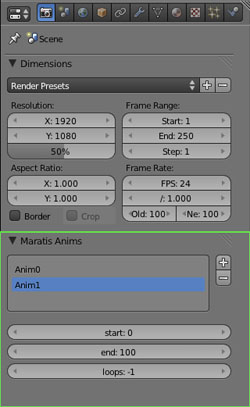
			<content type="html"><![CDATA[<p>setAnimationSpeed works with all animation, armature, materials and textures.<br />It&#039;s used in the particles example to control particles fade speed : <a href="http://www.maratis3d.org/download/SpecialEffects.zip">http://www.maratis3d.org/download/SpecialEffects.zip</a></p><p>But for a fade to black effect, for maximum control you should create a non-looping animation<br />and use &quot;setCurrentFrame&quot; so you can have the exact fade you want.</p><p>- do a fading animation from frame 0 to frame 100, and set loops to 0 instead of -1 in Blender (see screenshot)<br />- in lua use &quot;setCurrentFrame(object, percent)&quot;</p><p><span class="postimg"><img src="http://www.maratis3d.com/wp-content/uploads/2011/01/12.jpg" alt="http://www.maratis3d.com/wp-content/uploads/2011/01/12.jpg" /></span></p>]]></content>
			<author>
				<name><![CDATA[anael]]></name>
				<uri>http://forum.maratis3d.com/profile.php?id=2</uri>
			</author>
			<updated>2014-06-06T11:39:35Z</updated>
			<id>http://forum.maratis3d.com/viewtopic.php?pid=6868#p6868</id>
		</entry>
		<entry>
			<title type="html"><![CDATA[Re: blender mesh with animation(changing alpha)]]></title>
			<link rel="alternate" href="http://forum.maratis3d.com/viewtopic.php?pid=6867#p6867"/>
			<content type="html"><![CDATA[<p>Thanks, that helped me!<br />and SetAnimationSpeed doesn&#039;t work with animated textures, does it mean i should control fade speed by animation length in blender or there are some other ways to control animation speed?</p>]]></content>
			<author>
				<name><![CDATA[hog]]></name>
				<uri>http://forum.maratis3d.com/profile.php?id=2795</uri>
			</author>
			<updated>2014-06-06T11:18:25Z</updated>
			<id>http://forum.maratis3d.com/viewtopic.php?pid=6867#p6867</id>
		</entry>
		<entry>
			<title type="html"><![CDATA[Re: blender mesh with animation(changing alpha)]]></title>
			<link rel="alternate" href="http://forum.maratis3d.com/viewtopic.php?pid=6866#p6866"/>
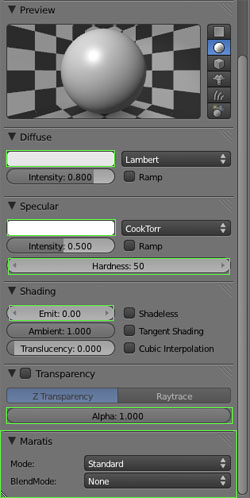
			<content type="html"><![CDATA[<p>Hi, you should look at this tutorial : <a href="http://www.maratis3d.org/?p=277">http://www.maratis3d.org/?p=277</a></p><p>You can animate the &quot;Alpha&quot; value :<br /><span class="postimg"><img src="http://www.maratis3d.com/wp-content/uploads/2011/01/04.jpg" alt="http://www.maratis3d.com/wp-content/uploads/2011/01/04.jpg" /></span></p><p>- move your mouse over the &quot;Alpha&quot; value and press &quot;i&quot; on your keyboard to create an animation key.<br />- move the current frame in the timeline, change the alpha value and press &quot;i&quot; again</p>]]></content>
			<author>
				<name><![CDATA[anael]]></name>
				<uri>http://forum.maratis3d.com/profile.php?id=2</uri>
			</author>
			<updated>2014-06-06T10:22:07Z</updated>
			<id>http://forum.maratis3d.com/viewtopic.php?pid=6866#p6866</id>
		</entry>
		<entry>
			<title type="html"><![CDATA[blender mesh with animation(changing alpha)]]></title>
			<link rel="alternate" href="http://forum.maratis3d.com/viewtopic.php?pid=6865#p6865"/>
			<content type="html"><![CDATA[<p>Hey guys!<br />I need fade in\out effect, so i think the easiest way is to do black plane in blender with animation, in each frame we change alpha value. I&#039;ve tried to do it, but i don&#039;t understand exactly how to release it in blender.&nbsp; so could you help?</p>]]></content>
			<author>
				<name><![CDATA[hog]]></name>
				<uri>http://forum.maratis3d.com/profile.php?id=2795</uri>
			</author>
			<updated>2014-06-06T09:28:32Z</updated>
			<id>http://forum.maratis3d.com/viewtopic.php?pid=6865#p6865</id>
		</entry>
</feed>