<?xml version="1.0" encoding="utf-8"?>
<feed xmlns="http://www.w3.org/2005/Atom">
	<title type="html"><![CDATA[Maratis forum - Maratis3d models speeding]]></title>
	<link rel="self" href="http://forum.maratis3d.com/extern.php?action=feed&amp;tid=1019&amp;type=atom"/>
	<updated>2014-07-12T21:34:08Z</updated>
	<generator>PunBB</generator>
	<id>http://forum.maratis3d.com/viewtopic.php?id=1019</id>
		<entry>
			<title type="html"><![CDATA[Re: Maratis3d models speeding]]></title>
			<link rel="alternate" href="http://forum.maratis3d.com/viewtopic.php?pid=6974#p6974"/>
			<content type="html"><![CDATA[<p>Thanks! AV-sync fixed it</p>]]></content>
			<author>
				<name><![CDATA[cygorx]]></name>
				<uri>http://forum.maratis3d.com/profile.php?id=2837</uri>
			</author>
			<updated>2014-07-12T21:34:08Z</updated>
			<id>http://forum.maratis3d.com/viewtopic.php?pid=6974#p6974</id>
		</entry>
		<entry>
			<title type="html"><![CDATA[Re: Maratis3d models speeding]]></title>
			<link rel="alternate" href="http://forum.maratis3d.com/viewtopic.php?pid=6973#p6973"/>
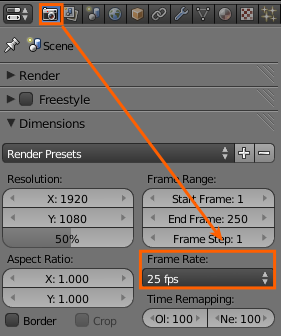
			<content type="html"><![CDATA[<p>Hi,<br />welcome !</p><p>Did you worked your animation at 60fps in Blender ?<br />To have the good preview, set the frame rate here in Blender :<br /><span class="postimg"><img src="http://4.bp.blogspot.com/-X954MLd9su4/UM6uFT_vlcI/AAAAAAAAD0Y/Ayx15zpSXo0/s1600/ubah+framerate.png" alt="http://4.bp.blogspot.com/-X954MLd9su4/UM6uFT_vlcI/AAAAAAAAD0Y/Ayx15zpSXo0/s1600/ubah+framerate.png" /></span></p><p>You may also need to set the playback sync mode to &quot;AV-sync&quot; (in the timeline windows)</p>]]></content>
			<author>
				<name><![CDATA[anael]]></name>
				<uri>http://forum.maratis3d.com/profile.php?id=2</uri>
			</author>
			<updated>2014-07-12T20:56:33Z</updated>
			<id>http://forum.maratis3d.com/viewtopic.php?pid=6973#p6973</id>
		</entry>
		<entry>
			<title type="html"><![CDATA[Maratis3d models speeding]]></title>
			<link rel="alternate" href="http://forum.maratis3d.com/viewtopic.php?pid=6972#p6972"/>
			<content type="html"><![CDATA[<p>Hi,<br />I&#039;ve created some model animations in Blender to be exported in Maratis3d. I have exported the files in 60 fps and Maratis3d claims to be playing the animations in 60 fps as well. However, when the animations are displayed in Maratis3d, the animations are a lot faster. Is this an error, and can I change a setting in Maratis so that it plays at the same speed as in Blender?<br />Apologies in advance if there&#039;s already another post about this or I&#039;m not giving enough information.<br />Thanks.</p>]]></content>
			<author>
				<name><![CDATA[cygorx]]></name>
				<uri>http://forum.maratis3d.com/profile.php?id=2837</uri>
			</author>
			<updated>2014-07-12T17:45:57Z</updated>
			<id>http://forum.maratis3d.com/viewtopic.php?pid=6972#p6972</id>
		</entry>
</feed>
