<?xml version="1.0" encoding="utf-8"?>
<feed xmlns="http://www.w3.org/2005/Atom">
	<title type="html"><![CDATA[Maratis forum - How to make texture transparent by shader?]]></title>
	<link rel="self" href="http://forum.maratis3d.com/extern.php?action=feed&amp;tid=1032&amp;type=atom"/>
	<updated>2014-07-25T15:32:50Z</updated>
	<generator>PunBB</generator>
	<id>http://forum.maratis3d.com/viewtopic.php?id=1032</id>
		<entry>
			<title type="html"><![CDATA[Re: How to make texture transparent by shader?]]></title>
			<link rel="alternate" href="http://forum.maratis3d.com/viewtopic.php?pid=7023#p7023"/>
			<content type="html"><![CDATA[<p>Set blend mode to alpha and it worked. Thanks a lot anael.</p>]]></content>
			<author>
				<name><![CDATA[Skywriter]]></name>
				<uri>http://forum.maratis3d.com/profile.php?id=2629</uri>
			</author>
			<updated>2014-07-25T15:32:50Z</updated>
			<id>http://forum.maratis3d.com/viewtopic.php?pid=7023#p7023</id>
		</entry>
		<entry>
			<title type="html"><![CDATA[Re: How to make texture transparent by shader?]]></title>
			<link rel="alternate" href="http://forum.maratis3d.com/viewtopic.php?pid=7022#p7022"/>
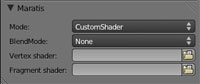
			<content type="html"><![CDATA[<p>&quot;gl_FragColor = vec4(pixel.r,pixel.g,pixel.b,0.2)&quot; is correct.</p><p>But you need to select the correct Blending mode in the material to see it :</p><p><span class="postimg"><img src="http://www.maratis3d.com/wp-content/uploads/2011/01/05.jpg" alt="http://www.maratis3d.com/wp-content/uploads/2011/01/05.jpg" /></span></p>]]></content>
			<author>
				<name><![CDATA[anael]]></name>
				<uri>http://forum.maratis3d.com/profile.php?id=2</uri>
			</author>
			<updated>2014-07-25T15:23:00Z</updated>
			<id>http://forum.maratis3d.com/viewtopic.php?pid=7022#p7022</id>
		</entry>
		<entry>
			<title type="html"><![CDATA[How to make texture transparent by shader?]]></title>
			<link rel="alternate" href="http://forum.maratis3d.com/viewtopic.php?pid=7021#p7021"/>
			<content type="html"><![CDATA[<p>Hi i&#039;m trying to make texture transparent and gl_FragColor = vec4(pixel.r,pixel.g,pixel.b,0.2) wont do the trick. Tried to do this with color but it just wont make it transparent. I&#039;m using .png image and it has no transparent parts. Is it possible to make it partly transparent by shader? Please advice</p>]]></content>
			<author>
				<name><![CDATA[Skywriter]]></name>
				<uri>http://forum.maratis3d.com/profile.php?id=2629</uri>
			</author>
			<updated>2014-07-25T15:11:14Z</updated>
			<id>http://forum.maratis3d.com/viewtopic.php?pid=7021#p7021</id>
		</entry>
</feed>