<?xml version="1.0" encoding="utf-8"?>
<feed xmlns="http://www.w3.org/2005/Atom">
	<title type="html"><![CDATA[Maratis forum - terrain ?]]></title>
	<link rel="self" href="http://forum.maratis3d.com/extern.php?action=feed&amp;tid=15&amp;type=atom"/>
	<updated>2013-04-12T16:41:09Z</updated>
	<generator>PunBB</generator>
	<id>http://forum.maratis3d.com/viewtopic.php?id=15</id>
		<entry>
			<title type="html"><![CDATA[Re: terrain ?]]></title>
			<link rel="alternate" href="http://forum.maratis3d.com/viewtopic.php?pid=3982#p3982"/>
			<content type="html"><![CDATA[<p>Hi Ireheart,</p><p>Anael has &#039;terrain&#039; near the bottom of the list of priorities, because he is trying to produce better docs for Maratis as well as other important things, as you can see at the TODO list.</p><p>Many of us want a &#039;real&#039; terrain system, but that won&#039;t happen anytime soon. I think Maratis started out as a simple engine for making quick small games, with a eye on mobile, given the increasing popularity of that market.</p><p>BUT, that&#039;s not to say, he would reject others creating that new terrain system, and incorporate it into Maratis. </p><p>This is open source, free software ( editor is GPL, engine ZLIB ) , so there is nothing holding back anyone from contributing . You can easily ( as noted by Anael) create&nbsp; your own terrain system if you wish, for now, and use the virtual Mcore to interface it with Maratis.</p><p>Cheers<br />Gm</p>]]></content>
			<author>
				<name><![CDATA[VeganDev]]></name>
				<uri>http://forum.maratis3d.com/profile.php?id=18</uri>
			</author>
			<updated>2013-04-12T16:41:09Z</updated>
			<id>http://forum.maratis3d.com/viewtopic.php?pid=3982#p3982</id>
		</entry>
		<entry>
			<title type="html"><![CDATA[Re: terrain ?]]></title>
			<link rel="alternate" href="http://forum.maratis3d.com/viewtopic.php?pid=3972#p3972"/>
			<content type="html"><![CDATA[<p>I would say i would very much like to see terrain with heightmap\texture paint support in the engine as well as&nbsp; brush support for making blocks. All the top game engines have these features, why should Maratis3d miss out on it? We can&#039;t all be blender experts. One thing i miss in this engine is a asset manager to easily browse assets.</p>]]></content>
			<author>
				<name><![CDATA[Ireheart]]></name>
				<uri>http://forum.maratis3d.com/profile.php?id=1449</uri>
			</author>
			<updated>2013-04-11T21:00:38Z</updated>
			<id>http://forum.maratis3d.com/viewtopic.php?pid=3972#p3972</id>
		</entry>
		<entry>
			<title type="html"><![CDATA[Re: terrain ?]]></title>
			<link rel="alternate" href="http://forum.maratis3d.com/viewtopic.php?pid=3958#p3958"/>
			<content type="html"><![CDATA[<div class="quotebox"><cite>anael wrote:</cite><blockquote><p>Another thing about using and playing with Maratis, the way the game plugin works, you have full access to the SDK (engine) in c++, you can use render to texture, draw triangles manually etc. If you really need a special feature, like LOD or adaptive terrain, if you have a developer in your team or if you are developer yourself, you can render terrain with your own code (using virtual MGame::draw()). So your game is having the feature you need, and you can then decide to share this code, to be included by default in the engine. that&#039;s why I&#039;m saying the first thing to help is to try playing with it and doing game or demos.</p><p>I will try to make more examples to show how to use custom code inside a game plugin.</p><p>Thank you,<br />Anaël.</p></blockquote></div><p>OUCH, I so totally missed reading this in your original post here Anael, so sorry about that.</p><p>That&#039;s what happens when you get busy and don&#039;t read everything &lt;take time to do so&gt;</p><p>That&#039;s great news...now there is no excuse to get busy and make that happen <img src="http://forum.maratis3d.com/img/smilies/wink.png" width="15" height="15" alt="wink" /></p><p>Thx for that,and sorry I missed it initially.</p><p>Cheers<br />Gm</p>]]></content>
			<author>
				<name><![CDATA[VeganDev]]></name>
				<uri>http://forum.maratis3d.com/profile.php?id=18</uri>
			</author>
			<updated>2013-04-10T16:30:39Z</updated>
			<id>http://forum.maratis3d.com/viewtopic.php?pid=3958#p3958</id>
		</entry>
		<entry>
			<title type="html"><![CDATA[Re: terrain ?]]></title>
			<link rel="alternate" href="http://forum.maratis3d.com/viewtopic.php?pid=3957#p3957"/>
			<content type="html"><![CDATA[<p>I was never in doubt, as to what a stencil map was, having worked with them extensively creating texture layers.</p><p>My question was &#039;how do you make a blendmap&#039;, and what they are, so I&#039;m still looking for a answer on that one ( Ill google and try to find something, but so far nothing .</p><p>Thanks btw for the GL URL, as I think all of us &#039;non professional/hobby&#039;&nbsp; coders need a jumpstart like that.<br />We already had code from Anael ( others?, don&#039;t recall atm) in the form of the 2 shaders , and &#039;where&#039; they go, but I think it&#039;s maybe semi cloudy as to how to adapt them for one&#039;s purpose maybe, so yes this URL with any luck ( haven&#039;t seen it yet) will give that needed HOWto info to those whom have never used GLSL before <img src="http://forum.maratis3d.com/img/smilies/wink.png" width="15" height="15" alt="wink" /></p><p>Thanks for the detective work <img src="http://forum.maratis3d.com/img/smilies/wink.png" width="15" height="15" alt="wink" /></p><p>So back to my initial question, what is this blendmap being discussed, and how do YOu create one inside blender for example ?</p><p>Gm</p>]]></content>
			<author>
				<name><![CDATA[VeganDev]]></name>
				<uri>http://forum.maratis3d.com/profile.php?id=18</uri>
			</author>
			<updated>2013-04-10T15:49:46Z</updated>
			<id>http://forum.maratis3d.com/viewtopic.php?pid=3957#p3957</id>
		</entry>
		<entry>
			<title type="html"><![CDATA[Re: terrain ?]]></title>
			<link rel="alternate" href="http://forum.maratis3d.com/viewtopic.php?pid=3955#p3955"/>
			<content type="html"><![CDATA[<p>So, just to follow-up on a previous post of mine (#53) where I was asking for some assistance on GLSL stuff, so I could understand more of what I&#039;m doing when I&#039;m using these scripts...</p><p>I continued looking up tutorials on Google for GL Shading Language and did finally find one that seems (so far, anyway) to be what I was looking for. So far it&#039;s been helpful for me with wrapping my brain around it. We&#039;ll see how I fare once I&#039;m done with it <img src="http://forum.maratis3d.com/img/smilies/tongue.png" width="15" height="15" alt="tongue" /></p><p>Here&#039;s the site/page...<br /><a href="http://www.lighthouse3d.com/tutorials/glsl-core-tutorial/">http://www.lighthouse3d.com/tutorials/g &#133; -tutorial/</a></p><p>Maybe it&#039;ll help someone else as well.</p>]]></content>
			<author>
				<name><![CDATA[Ayulin]]></name>
				<uri>http://forum.maratis3d.com/profile.php?id=1442</uri>
			</author>
			<updated>2013-04-10T11:41:03Z</updated>
			<id>http://forum.maratis3d.com/viewtopic.php?pid=3955#p3955</id>
		</entry>
		<entry>
			<title type="html"><![CDATA[Re: terrain ?]]></title>
			<link rel="alternate" href="http://forum.maratis3d.com/viewtopic.php?pid=3951#p3951"/>
			<content type="html"><![CDATA[<div class="quotebox"><cite>gamemaker wrote:</cite><blockquote><p>Sorry to continue to make this a tad confusing, but I seem to be atm. Using Maratis and setting up script is relatively easy, but getting those assets out of blender sometimes is challenging. I was using the simple texture painting method with only a uvmap and no stencil, but I understand that&#039;s limited texture wize and also eats up more ram, so that&#039;s not good.</p><p>I also need to clear up a mistunderstanding that I think is going in.</p><p>I commented on trying to be clear about something Ayulin was saying re: blendmap, and I mentioned &#039;is it a heightmap&#039; in my response and he seemed to be indicating, that yes that&#039;s indeed it, but having gone back and verifying what was being said and the comments that followed, I think that&#039;s not the case.</p><p>It seems, as Anael eluded to, that the blendmap is what does the blending (glsl?), so I guess on this point Im confused, so could someone please enlighten me/us on &#039;how&#039; to create this blendmap and what it takes to do that ? <img src="http://forum.maratis3d.com/img/smilies/wink.png" width="15" height="15" alt="wink" /></p><p>I have googled, but Im finding absolutely nothing about it.</p><p>Thanks!<br />Gm</p></blockquote></div><p>Heheh no problem. </p><p>It&#039;s not a heightmap literally.</p><p>I understood what you were getting at, since both heightmaps and the stencil map look similar... black, white and shades of gray.</p><p>The difference is that in a heightmap, each pixel determines the height/elevation of its corresponding vertex in a terrain mesh. In a stencilmap each pixel determines the opacity of a texture at that point of the object it&#039;s applied to.</p><p>To help clear it up... don&#039;t think of it as a heightmap at all. Completely different purpose.</p><p>Think of it more like a Layer Mask in Photoshop or Gimp, where the black, white and gray pixels determine the opacity of part of an image.</p><p>There might be a bit of confusion using &quot;blendmap&quot; versus &quot;stencil map&quot;.. So to clarify that, let&#039;s go with the following...</p><p>&quot;Stencil Map&quot; = the black, white and grayscale image used for the multitexturing method I&#039;ve demonstrated in this thread. </p><p>&quot;Blendmap&quot; = the color map where R, G, B and such determines where and how textures are &quot;blended&quot; on an object&#039;s surface.</p><p>They&#039;re two completely different methods of doing the same thing, except that the color blendmap approach seems to give better control and is a bit more straight-forward to use (setup of the GLSL code notwithstanding).</p><p>Hopefully that helps lol.</p>]]></content>
			<author>
				<name><![CDATA[Ayulin]]></name>
				<uri>http://forum.maratis3d.com/profile.php?id=1442</uri>
			</author>
			<updated>2013-04-10T04:41:03Z</updated>
			<id>http://forum.maratis3d.com/viewtopic.php?pid=3951#p3951</id>
		</entry>
		<entry>
			<title type="html"><![CDATA[Re: terrain ?]]></title>
			<link rel="alternate" href="http://forum.maratis3d.com/viewtopic.php?pid=3950#p3950"/>
			<content type="html"><![CDATA[<p>Sorry to continue to make this a tad confusing, but I seem to be atm. Using Maratis and setting up script is relatively easy, but getting those assets out of blender sometimes is challenging. I was using the simple texture painting method with only a uvmap and no stencil, but I understand that&#039;s limited texture wize and also eats up more ram, so that&#039;s not good.</p><p>I also need to clear up a mistunderstanding that I think is going in.</p><p>I commented on trying to be clear about something Ayulin was saying re: blendmap, and I mentioned &#039;is it a heightmap&#039; in my response and he seemed to be indicating, that yes that&#039;s indeed it, but having gone back and verifying what was being said and the comments that followed, I think that&#039;s not the case.</p><p>It seems, as Anael eluded to, that the blendmap is what does the blending (glsl?), so I guess on this point Im confused, so could someone please enlighten me/us on &#039;how&#039; to create this blendmap and what it takes to do that ? <img src="http://forum.maratis3d.com/img/smilies/wink.png" width="15" height="15" alt="wink" /></p><p>I have googled, but Im finding absolutely nothing about it.</p><p>Thanks!<br />Gm</p>]]></content>
			<author>
				<name><![CDATA[VeganDev]]></name>
				<uri>http://forum.maratis3d.com/profile.php?id=18</uri>
			</author>
			<updated>2013-04-10T03:23:47Z</updated>
			<id>http://forum.maratis3d.com/viewtopic.php?pid=3950#p3950</id>
		</entry>
		<entry>
			<title type="html"><![CDATA[Re: terrain ?]]></title>
			<link rel="alternate" href="http://forum.maratis3d.com/viewtopic.php?pid=3948#p3948"/>
			<content type="html"><![CDATA[<p>So, now that I&#039;m ready to begin learning all this texture blending stuff, I&#039;m looking through this thread at the various posts and, I have to admit, it&#039;s all going right over my head. I see numerous different examples of different scripts, some called &quot;frag&quot; some called &quot;vert&quot;, but I don&#039;t know which I&#039;m supposed to use, or if I should use both?</p><p>I also see some written for what seems like different combinations of texture layers, and I&#039;m not sure which is which. I don&#039;t understand where in the script the textures are defined - or is that derived directly from the texture layer in Blender? It&#039;s all kind of confusing to someone like myself that&#039;s completely clueless in these things.</p><p>So, rather than trying to make heads or tails of all the different scripts posted here and what they&#039;re specifically doing, let me try something else... Please understand that posting a script and saying &quot;here&quot; is great, but if there&#039;s some kind of tutorial intended to show non-programmers how to set a model up with the correct texture settings, and with the correct GLSL code, that would be awesome. Providing the script is awesome, and quite generous.. but if I don&#039;t know what I&#039;m looking at or where and how to use it, or what&#039;s doing what, it&#039;s all for naught.</p><p>The effect I would like to have is the ability to have, say, 4 texture layers, each with a normal map. So, in Blender it might look something like this:</p><p>Layer 1: Blend Map<br />Layer 2: Texture 1 (dirt, for example)<br />Layer 3: Normal Map 1 (for dirt texture)<br />Layer 4: Texture 2 (stone, for example)<br />Layer 5: Normal Map 2 (for stone texture)<br />Layer 6: Texture 3 (grass for example)<br />Layer 7: Normal Map 3 (for grass texture)<br />Layer 8: Texture 4 (second grass texture, for example)</p><p>Something like that... </p><p>What would I need to set up? Would I need one script, or two? Which types would I need to assign?</p><p>When would I use VertShad, FragShad, Z VertShad and Z FragShad?</p><p>Is there any basic instruction one what these are and what they&#039;re for?</p><p>I realize people have posted examples and such, but there&#039;s several different scripts, I&#039;m not sure which situation I would use which script in, and none of it makes any sense to me. I&#039;ve tried finding beginners&#039; basic tutorials on GL Shader Language, but every one I&#039;ve found assumes you&#039;re already familiar with Open GL Programming.. so it&#039;s clearly not a topic for &quot;new programmers&quot; to be able to pick up on easily... So, if there&#039;s just some basic instructions available somewhere saying &quot;okay, you use this script to do &quot;x&quot;, these specific parts control &quot;y&quot; and you&#039;d apply it like &quot;this&quot; to accomplish &quot;z&quot;... that would be great. I don&#039;t know if such a thing can really be done, but well... can&#039;t hurt to ask, right? <img src="http://forum.maratis3d.com/img/smilies/tongue.png" width="15" height="15" alt="tongue" /></p><p>Thanks in advance <img src="http://forum.maratis3d.com/img/smilies/smile.png" width="15" height="15" alt="smile" /></p>]]></content>
			<author>
				<name><![CDATA[Ayulin]]></name>
				<uri>http://forum.maratis3d.com/profile.php?id=1442</uri>
			</author>
			<updated>2013-04-10T00:24:00Z</updated>
			<id>http://forum.maratis3d.com/viewtopic.php?pid=3948#p3948</id>
		</entry>
		<entry>
			<title type="html"><![CDATA[Re: terrain ?]]></title>
			<link rel="alternate" href="http://forum.maratis3d.com/viewtopic.php?pid=3945#p3945"/>
			<content type="html"><![CDATA[<p>I will certainly give that a try. My island.blend has horrid stretching on one side of it, and I do not think I can fix it without redoing the texture work. Sad but true <img src="http://forum.maratis3d.com/img/smilies/wink.png" width="15" height="15" alt="wink" /></p><p>I&#039;ll definitely give the stencil map in-betweens a shot and see if it helps.</p><p>Thx for all that <img src="http://forum.maratis3d.com/img/smilies/wink.png" width="15" height="15" alt="wink" /></p><p>cheers<br />Gm</p>]]></content>
			<author>
				<name><![CDATA[VeganDev]]></name>
				<uri>http://forum.maratis3d.com/profile.php?id=18</uri>
			</author>
			<updated>2013-04-09T20:51:14Z</updated>
			<id>http://forum.maratis3d.com/viewtopic.php?pid=3945#p3945</id>
		</entry>
		<entry>
			<title type="html"><![CDATA[Re: terrain ?]]></title>
			<link rel="alternate" href="http://forum.maratis3d.com/viewtopic.php?pid=3944#p3944"/>
			<content type="html"><![CDATA[<div class="quotebox"><cite>gamemaker wrote:</cite><blockquote><p>So Ayulin, you are saying that to save memory I should try using 512 textures, and making the stencils inbetween each texture 1024, correct ?</p><p>thx<br />Gm</p></blockquote></div><p>Hey there..</p><p>Well I used those numbers as an example of the process itself; how you can work with 2 or 3 smaller tilable images and then blend them with a blend map.</p><p>The size for the blend map depends on how fine of detail you want in the texture blending. The more space you have in the blend map, the sharper and more &quot;fine&quot; the transitions can be, and in a smaller amount of space. </p><p>The the actual textures themselves, 512x512 is a nice image size if you&#039;re using a pattern that you want to repeat a lot (like a tiled floor, a generic ground/grass texture, etc) while maintaining enough variation so it doesn&#039;t look *too* repetitive. If you&#039;re using something that you want less repetition in, it might be better to use a somewhat larger image size... 1024x1024 might fit that perfectly. It all depends on your needs and what you need each individual texture/tile to do. I believe the dirt texture I&#039;m using in my shot, with the small plants, is 512x512, and I&#039;m able to get a nice degree of variation in there so you really don&#039;t see much of a recognizable pattern when it&#039;s tiled over a large area - that has a lot to do with how the texture is created, though. </p><p>As you work with that method and see the results, you&#039;ll get a feel for what you can get away with in terms of what size your textures and blendmaps are.&nbsp; &quot;Horses for courses&quot;, as the saying goes.</p>]]></content>
			<author>
				<name><![CDATA[Ayulin]]></name>
				<uri>http://forum.maratis3d.com/profile.php?id=1442</uri>
			</author>
			<updated>2013-04-09T20:26:21Z</updated>
			<id>http://forum.maratis3d.com/viewtopic.php?pid=3944#p3944</id>
		</entry>
		<entry>
			<title type="html"><![CDATA[Re: terrain ?]]></title>
			<link rel="alternate" href="http://forum.maratis3d.com/viewtopic.php?pid=3943#p3943"/>
			<content type="html"><![CDATA[<p>So Ayulin, you are saying that to save memory I should try using 512 textures, and making the stencils inbetween each texture 1024, correct ?</p><p>thx<br />Gm</p>]]></content>
			<author>
				<name><![CDATA[VeganDev]]></name>
				<uri>http://forum.maratis3d.com/profile.php?id=18</uri>
			</author>
			<updated>2013-04-09T18:57:46Z</updated>
			<id>http://forum.maratis3d.com/viewtopic.php?pid=3943#p3943</id>
		</entry>
		<entry>
			<title type="html"><![CDATA[Re: terrain ?]]></title>
			<link rel="alternate" href="http://forum.maratis3d.com/viewtopic.php?pid=3939#p3939"/>
			<content type="html"><![CDATA[<p>yes same textures are only once in memory, it is the same for mesh files, sounds, fonts...</p>]]></content>
			<author>
				<name><![CDATA[anael]]></name>
				<uri>http://forum.maratis3d.com/profile.php?id=2</uri>
			</author>
			<updated>2013-04-09T16:03:55Z</updated>
			<id>http://forum.maratis3d.com/viewtopic.php?pid=3939#p3939</id>
		</entry>
		<entry>
			<title type="html"><![CDATA[Re: terrain ?]]></title>
			<link rel="alternate" href="http://forum.maratis3d.com/viewtopic.php?pid=3935#p3935"/>
			<content type="html"><![CDATA[<div class="quotebox"><cite>gamemaker wrote:</cite><blockquote><p>@Auylin,Anael,</p><p>Thx anael for reminder about repeating textures, as I definitely need some of that on mine as they are far too stretched atm, even looking at them from the distance <img src="http://forum.maratis3d.com/img/smilies/wink.png" width="15" height="15" alt="wink" /></p><p>To Auylin, I shall indeed try the RGBB as noted in this thread. I also want to mirror the fact that Im a much better artist and creative person, than programmer ( definitely right brain here too ), but hopefully as you noted, I can progress as I learn the finer details of programming and apply them for experience. Im sure you will find this to be true as well, that I have over time found I enjoy programming more than I thought I would&nbsp; so it becomes easier as I go. Thankfully lua makes this learning curve a lot easier at least for scripting.</p><p>P.s.-When you referred to the stencil/blendmap in one of your prior posts above , and then mentioned their large sizes, were you referring to the heightmap you used for displacement, as that&#039;s what it sure sounds like; just wanted to make sure it was that and not something else, as if it&#039;s something else I have no idea what you meant by that reference of blendmap.</p></blockquote></div><br /><p>Ahh, so you can relate to the challenge of wrapping your head around coding then. Nice! Seems, though, that you have a better grasp on programming than I do. I have books on C++, Python, Java, and a few others... and I can&#039;t make progress with any of them. I get into the first couple chapters and it all just goes completely over my head. I don&#039;t know why. Maybe I&#039;m making it more difficult than it actually is for myself? No idea. I just can&#039;t seem to grasp it, though I&#039;ve tried. It would make my life a lot easier if I knew how to implement things myself, rather than having to hope I can find an engine that does it for me, or hope someone else could help me with doing so, which is a stretch. In my experience, professionally and personally, programmers tend to be protective of what they know. I say this having been good friends with two programmers for many years. One was happy to share whatever they knew, the other was like &quot;No I won&#039;t share or explain my code! Learn it yourself!&quot;. </p><p>As for the stencil map, yes, that&#039;s what I was referring to with large sizes. Because the blend map is only controlling what is hidden or shown, and doesn&#039;t provide any color/detail itself, you can tend to get away with a lower resolution image than you might if you were using a single image map. Of course, using a higher resolution stencil map allows you to paint in finer details, which might be preferable, but I&#039;ve yet to see a situation where that&#039;s been *super* important. </p><p>Look at it like this... If you&#039;re using a single image as a UV Map that covers the entire model, the only way you can maintain a high level of pixel density/image resolution is by using really large images (4096x4096, etc). Those can eat up quite a bit of memory when they start adding up.</p><p>For a system that uses a stencil map, or a color map (both serve the same function, just in different ways), you can be using individual tiling textures that are maybe 512x512, and then a single color/stencil map that controls their visibility/blending on the object. And that color/blend map can be 1024x1024, or maybe even 512x512 if you&#039;re using it in an area that doesn&#039;t require a lot of fine blending. </p><p>I just find that you can get far more detail with a significantly lower memory cost using the blend-map approach, than you could using the UV map approach. </p><p>Now that&#039;s in terms of file size and memory cost. I don&#039;t know what the cost is in terms of processing overhead to tile the image layers and blend them, versus just laying a single UV image over an object. I&#039;m sure the processing cost is higher, but how much higher? I don&#039;t know. Considering many games I&#039;ve played use the tiled texture/blendmap approach, I&#039;m assuming it&#039;s not very significant.</p><p>Edit: I had a thought after posting this. When you&#039;re setting up these materials via the texture blend scripts, is Blender, or Maratis for that matter, loading the textures into memory for each individual object? Or, is it just referencing the images on disk, so it only has to load them once? I&#039;m thinking in terms of efficiency when you have many objects using the same textures. For example, in my current prototype project, many of the objects are going to use the same textures (grass, dirt, stone, etc). So, instead of the textures being loaded up for each object using them, if they could be sorta &quot;pre-loaded&quot; into memory, and then simply referenced for each object using them, I imagine that would save a lot of memory as well. It&#039;s kind of a form of instancing, essentially.</p>]]></content>
			<author>
				<name><![CDATA[Ayulin]]></name>
				<uri>http://forum.maratis3d.com/profile.php?id=1442</uri>
			</author>
			<updated>2013-04-09T12:22:47Z</updated>
			<id>http://forum.maratis3d.com/viewtopic.php?pid=3935#p3935</id>
		</entry>
		<entry>
			<title type="html"><![CDATA[Re: terrain ?]]></title>
			<link rel="alternate" href="http://forum.maratis3d.com/viewtopic.php?pid=3934#p3934"/>
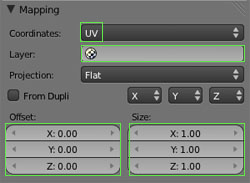
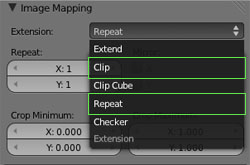
			<content type="html"><![CDATA[<div class="quotebox"><cite>anael wrote:</cite><blockquote><p>The RBG blendmap is normally working good, you can use each component to mix different textures and you can use tiling.</p><p>Just to clarify, there is two ways to tile your texture :</p><p>- directly in the uv (by scaling your uv down)</p><p>- or/and by using the texture size (from the doc) :</p><p><span class="postimg"><img src="http://www.maratis3d.com/wp-content/uploads/2011/01/10.jpg" alt="http://www.maratis3d.com/wp-content/uploads/2011/01/10.jpg" /></span></p><br /><p>Be also sure that your texture is in repeat mode :<br /><span class="postimg"><img src="http://www.maratis3d.com/wp-content/uploads/2011/01/09.jpg" alt="http://www.maratis3d.com/wp-content/uploads/2011/01/09.jpg" /></span></p></blockquote></div><br /><p>Oh that&#039;s excellent! So Maratis does support Blender&#039;s &quot;repeat&quot; functionality then? That&#039;s sweet! That means I don&#039;t have to use two UV sets <img src="http://forum.maratis3d.com/img/smilies/tongue.png" width="15" height="15" alt="tongue" />. Beautiful!</p><p>Okay, well I&#039;ve been in &quot;documentation and logo/site design mode&quot; for my project since the end of this weekend, but I&#039;m definitely going to dive more into this soon. It&#039;s fun being the only person covering all aspects at the beginning of a project. A ton of work.. but fun... except for the documentation part. I hate documentation.</p><p>PS: I don&#039;t know if anyone else has this issue, but for some reason, the first time I submit a post I&#039;ve typed up, most of it gets chopped off. I have to edit the post and then re-submit it for it to show the whole thing. Very odd.</p>]]></content>
			<author>
				<name><![CDATA[Ayulin]]></name>
				<uri>http://forum.maratis3d.com/profile.php?id=1442</uri>
			</author>
			<updated>2013-04-09T12:09:32Z</updated>
			<id>http://forum.maratis3d.com/viewtopic.php?pid=3934#p3934</id>
		</entry>
		<entry>
			<title type="html"><![CDATA[Re: terrain ?]]></title>
			<link rel="alternate" href="http://forum.maratis3d.com/viewtopic.php?pid=3933#p3933"/>
			<content type="html"><![CDATA[<p>@Auylin,Anael,</p><p>Thx anael for reminder about repeating textures, as I definitely need some of that on mine as they are far too stretched atm, even looking at them from the distance <img src="http://forum.maratis3d.com/img/smilies/wink.png" width="15" height="15" alt="wink" /></p><p>To Auylin, I shall indeed try the RGBB as noted in this thread. I also want to mirror the fact that Im a much better artist and creative person, than programmer ( definitely right brain here too ), but hopefully as you noted, I can progress as I learn the finer details of programming and apply them for experience. Im sure you will find this to be true as well, that I have over time found I enjoy programming more than I thought I would&nbsp; so it becomes easier as I go. Thankfully lua makes this learning curve a lot easier at least for scripting.</p><p>P.s.-When you referred to the stencil/blendmap in one of your prior posts above , and then mentioned their large sizes, were you referring to the heightmap you used for displacement, as that&#039;s what it sure sounds like; just wanted to make sure it was that and not something else, as if it&#039;s something else I have no idea what you meant by that reference of blendmap.</p>]]></content>
			<author>
				<name><![CDATA[VeganDev]]></name>
				<uri>http://forum.maratis3d.com/profile.php?id=18</uri>
			</author>
			<updated>2013-04-09T04:35:52Z</updated>
			<id>http://forum.maratis3d.com/viewtopic.php?pid=3933#p3933</id>
		</entry>
</feed>