<?xml version="1.0" encoding="utf-8"?>
<feed xmlns="http://www.w3.org/2005/Atom">
	<title type="html"><![CDATA[Maratis forum - Incompatibility with Blender 2.63[FIX NOW AVAILABLE!!]]]></title>
	<link rel="self" href="http://forum.maratis3d.com/extern.php?action=feed&amp;tid=406&amp;type=atom"/>
	<updated>2012-09-21T07:01:04Z</updated>
	<generator>PunBB</generator>
	<id>http://forum.maratis3d.com/viewtopic.php?id=406</id>
		<entry>
			<title type="html"><![CDATA[Re: Incompatibility with Blender 2.63[FIX NOW AVAILABLE!!]]]></title>
			<link rel="alternate" href="http://forum.maratis3d.com/viewtopic.php?pid=2677#p2677"/>
			<content type="html"><![CDATA[<p>I updated the tutorial : <a href="http://www.maratis3d.org/?p=277">http://www.maratis3d.org/?p=277</a><br />Hope it&#039;s more clear now <img src="http://forum.maratis3d.com/img/smilies/smile.png" width="15" height="15" alt="smile" /></p>]]></content>
			<author>
				<name><![CDATA[anael]]></name>
				<uri>http://forum.maratis3d.com/profile.php?id=2</uri>
			</author>
			<updated>2012-09-21T07:01:04Z</updated>
			<id>http://forum.maratis3d.com/viewtopic.php?pid=2677#p2677</id>
		</entry>
		<entry>
			<title type="html"><![CDATA[Re: Incompatibility with Blender 2.63[FIX NOW AVAILABLE!!]]]></title>
			<link rel="alternate" href="http://forum.maratis3d.com/viewtopic.php?pid=2674#p2674"/>
			<content type="html"><![CDATA[<p>Its ok, and thx for being willing to create and share such a great engine.</p><p>My french is really out of date, so we could share horror stories Im sure <img src="http://forum.maratis3d.com/img/smilies/wink.png" width="15" height="15" alt="wink" />&lt;wink&gt;</p><p>cu<br />Gm</p><br /><br /><div class="quotebox"><cite>anael wrote:</cite><blockquote><p>Ok, I&#039;ll try to make it more clear, at the time I wrote it my English was also even worst than now.</p></blockquote></div>]]></content>
			<author>
				<name><![CDATA[VeganDev]]></name>
				<uri>http://forum.maratis3d.com/profile.php?id=18</uri>
			</author>
			<updated>2012-09-21T00:40:08Z</updated>
			<id>http://forum.maratis3d.com/viewtopic.php?pid=2674#p2674</id>
		</entry>
		<entry>
			<title type="html"><![CDATA[Re: Incompatibility with Blender 2.63[FIX NOW AVAILABLE!!]]]></title>
			<link rel="alternate" href="http://forum.maratis3d.com/viewtopic.php?pid=2673#p2673"/>
			<content type="html"><![CDATA[<p>Ok, I&#039;ll try to make it more clear, at the time I wrote it my English was also even worst than now.</p>]]></content>
			<author>
				<name><![CDATA[anael]]></name>
				<uri>http://forum.maratis3d.com/profile.php?id=2</uri>
			</author>
			<updated>2012-09-20T15:22:43Z</updated>
			<id>http://forum.maratis3d.com/viewtopic.php?pid=2673#p2673</id>
		</entry>
		<entry>
			<title type="html"><![CDATA[Re: Incompatibility with Blender 2.63[FIX NOW AVAILABLE!!]]]></title>
			<link rel="alternate" href="http://forum.maratis3d.com/viewtopic.php?pid=2671#p2671"/>
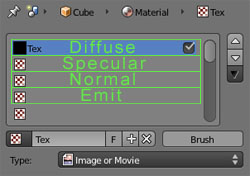
			<content type="html"><![CDATA[<p>I think that, <a href="http://www.maratis3d.org/?p=277,">http://www.maratis3d.org/?p=277,</a> could be alot more clear about whats supported and not. Nowhere on the page does it say, only the green boxed in areas are directly supported , and yes I did wonder what was meant by , &lt;image&gt; , which is noted at the texture slots spot.</p><p>Regardless, I&#039;ll take a look on forum where you referred to the custom shader, though I don&#039;t know how far I&nbsp; will get, given Im not a coder , short of real basic things.</p><p>cheers<br />Gm</p><br /><div class="quotebox"><cite>anael wrote:</cite><blockquote><p>Maratis materials are not working exactly the same as Blender,<br />the exporter supports only what is in green here : <a href="http://www.maratis3d.org/?p=277">http://www.maratis3d.org/?p=277</a></p><p>Complex materials needs a custom shader, there is some shaders in the link I sent before that are close.<br />It seems a bit complicated to write shaders at first, but it&#039;s very powerful.</p><p>I&#039;ll try to do a terrain example one day to propose a basic pipeline.</p></blockquote></div>]]></content>
			<author>
				<name><![CDATA[VeganDev]]></name>
				<uri>http://forum.maratis3d.com/profile.php?id=18</uri>
			</author>
			<updated>2012-09-20T14:37:18Z</updated>
			<id>http://forum.maratis3d.com/viewtopic.php?pid=2671#p2671</id>
		</entry>
		<entry>
			<title type="html"><![CDATA[Re: Incompatibility with Blender 2.63[FIX NOW AVAILABLE!!]]]></title>
			<link rel="alternate" href="http://forum.maratis3d.com/viewtopic.php?pid=2664#p2664"/>
			<content type="html"><![CDATA[<p>Maratis materials are not working exactly the same as Blender,<br />the exporter supports only what is in green here : <a href="http://www.maratis3d.org/?p=277">http://www.maratis3d.org/?p=277</a></p><p>Complex materials needs a custom shader, there is some shaders in the link I sent before that are close.<br />It seems a bit complicated to write shaders at first, but it&#039;s very powerful.</p><p>I&#039;ll try to do a terrain example one day to propose a basic pipeline.</p>]]></content>
			<author>
				<name><![CDATA[anael]]></name>
				<uri>http://forum.maratis3d.com/profile.php?id=2</uri>
			</author>
			<updated>2012-09-19T15:53:03Z</updated>
			<id>http://forum.maratis3d.com/viewtopic.php?pid=2664#p2664</id>
		</entry>
		<entry>
			<title type="html"><![CDATA[Re: Incompatibility with Blender 2.63[FIX NOW AVAILABLE!!]]]></title>
			<link rel="alternate" href="http://forum.maratis3d.com/viewtopic.php?pid=2660#p2660"/>
			<content type="html"><![CDATA[<p>I dont&#039; know how to answer this honestly...Im blending textures, but nothing like a brick wall; as noted in my prior post, Im using a rock base texture, grass and sand, with a stencil map inbetween first two textures, as seen here:</p><p><a href="http://vimeo.com/15679785">http://vimeo.com/15679785</a> &lt; That is what Im doing , except Im doing it with 3 total textures, and using blender 2.63a, not 2.5.</p><p>I think what I need is something Ive seen on forum before, which is creating a shader ( custom ) as you referenced, for up to 8 textures, and since im using 5 ( 2 stencil maps are part of that 5) I guess I&#039;d need that one ?</p><p>cheers<br />Gm</p><br /><br /><br /><br /><div class="quotebox"><cite>anael wrote:</cite><blockquote><p>It depend on the result you want, but a custom shader is generally the best, are you trying to blend textures for a terrain like this ?<br /><a href="http://forum.maratis3d.com/viewtopic.php?id=15&amp;p=2">http://forum.maratis3d.com/viewtopic.php?id=15&amp;p=2</a></p><p>You can also use the FixedRenderer in Maratis with a multi-texture material, but it&#039;s more limited as it&#039;s using an old technology (no shaders).</p></blockquote></div>]]></content>
			<author>
				<name><![CDATA[VeganDev]]></name>
				<uri>http://forum.maratis3d.com/profile.php?id=18</uri>
			</author>
			<updated>2012-09-19T11:50:12Z</updated>
			<id>http://forum.maratis3d.com/viewtopic.php?pid=2660#p2660</id>
		</entry>
		<entry>
			<title type="html"><![CDATA[Re: Incompatibility with Blender 2.63[FIX NOW AVAILABLE!!]]]></title>
			<link rel="alternate" href="http://forum.maratis3d.com/viewtopic.php?pid=2658#p2658"/>
			<content type="html"><![CDATA[<p>It depend on the result you want, but a custom shader is generally the best, are you trying to blend textures for a terrain like this ?<br /><a href="http://forum.maratis3d.com/viewtopic.php?id=15&amp;p=2">http://forum.maratis3d.com/viewtopic.php?id=15&amp;p=2</a></p><p>You can also use the FixedRenderer in Maratis with a multi-texture material, but it&#039;s more limited as it&#039;s using an old technology (no shaders).</p>]]></content>
			<author>
				<name><![CDATA[anael]]></name>
				<uri>http://forum.maratis3d.com/profile.php?id=2</uri>
			</author>
			<updated>2012-09-19T09:14:46Z</updated>
			<id>http://forum.maratis3d.com/viewtopic.php?pid=2658#p2658</id>
		</entry>
		<entry>
			<title type="html"><![CDATA[Re: Incompatibility with Blender 2.63[FIX NOW AVAILABLE!!]]]></title>
			<link rel="alternate" href="http://forum.maratis3d.com/viewtopic.php?pid=2654#p2654"/>
			<content type="html"><![CDATA[<p>I am already linking to the textures in blender, where I start with rock.png, add stencil, another texture, stencil and last texture, then I start to texture paint, so no, Im not using diffuse specuolar normal emit at all, at least not here .</p><p>I am therefore using &#039;fixed&#039;, but I am doing a multitexture mesh, multitexture being that Im using textures and applying to mesh via texture painting; I presume that is what you mean by multitexture in maratis GUI ?</p><p>So if I understand right, to get this to show right in Maratis, I need to create custom shader, so that means I should choose customshader in maratis gui as well...</p><p>thx<br />GM</p><br /><br /><div class="quotebox"><cite>anael wrote:</cite><blockquote><p>In Blender, link to the textures that are in the maps/ folder of your project,<br />then export again and the link should be ok.</p><p>Also, be sure that you are following this if you are using the standard material :<br /><span class="postimg"><img src="http://www.maratis3d.com/wp-content/uploads/2011/01/07.jpg" alt="http://www.maratis3d.com/wp-content/uploads/2011/01/07.jpg" /></span></p><p>Or if you don&#039;t follow this, you will need to use a custom shader.</p></blockquote></div>]]></content>
			<author>
				<name><![CDATA[VeganDev]]></name>
				<uri>http://forum.maratis3d.com/profile.php?id=18</uri>
			</author>
			<updated>2012-09-19T01:06:38Z</updated>
			<id>http://forum.maratis3d.com/viewtopic.php?pid=2654#p2654</id>
		</entry>
		<entry>
			<title type="html"><![CDATA[Re: Incompatibility with Blender 2.63[FIX NOW AVAILABLE!!]]]></title>
			<link rel="alternate" href="http://forum.maratis3d.com/viewtopic.php?pid=2652#p2652"/>
			<content type="html"><![CDATA[<p>In Blender, link to the textures that are in the maps/ folder of your project,<br />then export again and the link should be ok.</p><p>Also, be sure that you are following this if you are using the standard material :<br /><span class="postimg"><img src="http://www.maratis3d.com/wp-content/uploads/2011/01/07.jpg" alt="http://www.maratis3d.com/wp-content/uploads/2011/01/07.jpg" /></span></p><p>Or if you don&#039;t follow this, you will need to use a custom shader.</p>]]></content>
			<author>
				<name><![CDATA[anael]]></name>
				<uri>http://forum.maratis3d.com/profile.php?id=2</uri>
			</author>
			<updated>2012-09-18T20:30:06Z</updated>
			<id>http://forum.maratis3d.com/viewtopic.php?pid=2652#p2652</id>
		</entry>
		<entry>
			<title type="html"><![CDATA[Re: Incompatibility with Blender 2.63[FIX NOW AVAILABLE!!]]]></title>
			<link rel="alternate" href="http://forum.maratis3d.com/viewtopic.php?pid=2651#p2651"/>
			<content type="html"><![CDATA[<p>Object has been exportered with no errors, so thank you for the fix Anael.</p><p>I loaded my island.mesh into Maratis, but its black, no textures, and to be safe, I placed copies of all 3 textures I used to create the model, into the maps DIR.</p><p>Any ideas whats up ? <img src="http://forum.maratis3d.com/img/smilies/wink.png" width="15" height="15" alt="wink" /></p><p>thx<br />Gm</p><br /><br /><div class="quotebox"><cite>gamemaker wrote:</cite><blockquote><p>Ill try it later today, and thx for fix.<br />Any idea why blender creates a blank stencil1 ? <br />All tutorials I&#039;ve seen, require you to place a stencil inbetween all textures for texture painting to work.</p><p>cu<br />Gm</p><br /><br /><div class="quotebox"><cite>anael wrote:</cite><blockquote><p>Hi,</p><p>I made an update that ignore missing images (gamemaker) and that compute better bounding-box (Alinor)</p></blockquote></div></blockquote></div>]]></content>
			<author>
				<name><![CDATA[VeganDev]]></name>
				<uri>http://forum.maratis3d.com/profile.php?id=18</uri>
			</author>
			<updated>2012-09-18T18:24:23Z</updated>
			<id>http://forum.maratis3d.com/viewtopic.php?pid=2651#p2651</id>
		</entry>
		<entry>
			<title type="html"><![CDATA[Re: Incompatibility with Blender 2.63[FIX NOW AVAILABLE!!]]]></title>
			<link rel="alternate" href="http://forum.maratis3d.com/viewtopic.php?pid=2650#p2650"/>
			<content type="html"><![CDATA[<p>Ill try it later today, and thx for fix.<br />Any idea why blender creates a blank stencil1 ? <br />All tutorials I&#039;ve seen, require you to place a stencil inbetween all textures for texture painting to work.</p><p>cu<br />Gm</p><br /><br /><div class="quotebox"><cite>anael wrote:</cite><blockquote><p>Hi,</p><p>I made an update that ignore missing images (gamemaker) and that compute better bounding-box (Alinor)</p></blockquote></div>]]></content>
			<author>
				<name><![CDATA[VeganDev]]></name>
				<uri>http://forum.maratis3d.com/profile.php?id=18</uri>
			</author>
			<updated>2012-09-18T15:29:37Z</updated>
			<id>http://forum.maratis3d.com/viewtopic.php?pid=2650#p2650</id>
		</entry>
		<entry>
			<title type="html"><![CDATA[Re: Incompatibility with Blender 2.63[FIX NOW AVAILABLE!!]]]></title>
			<link rel="alternate" href="http://forum.maratis3d.com/viewtopic.php?pid=2649#p2649"/>
			<content type="html"><![CDATA[<p>this is work, thanks <img src="http://forum.maratis3d.com/img/smilies/wink.png" width="15" height="15" alt="wink" /></p>]]></content>
			<author>
				<name><![CDATA[Alinor]]></name>
				<uri>http://forum.maratis3d.com/profile.php?id=64</uri>
			</author>
			<updated>2012-09-18T15:28:50Z</updated>
			<id>http://forum.maratis3d.com/viewtopic.php?pid=2649#p2649</id>
		</entry>
		<entry>
			<title type="html"><![CDATA[Re: Incompatibility with Blender 2.63[FIX NOW AVAILABLE!!]]]></title>
			<link rel="alternate" href="http://forum.maratis3d.com/viewtopic.php?pid=2643#p2643"/>
			<content type="html"><![CDATA[<p>Hi,</p><p>I made an update that ignore missing images (gamemaker) and that compute better bounding-box (Alinor)</p>]]></content>
			<author>
				<name><![CDATA[anael]]></name>
				<uri>http://forum.maratis3d.com/profile.php?id=2</uri>
			</author>
			<updated>2012-09-18T10:09:50Z</updated>
			<id>http://forum.maratis3d.com/viewtopic.php?pid=2643#p2643</id>
		</entry>
		<entry>
			<title type="html"><![CDATA[Re: Incompatibility with Blender 2.63[FIX NOW AVAILABLE!!]]]></title>
			<link rel="alternate" href="http://forum.maratis3d.com/viewtopic.php?pid=2642#p2642"/>
			<content type="html"><![CDATA[<p>Ok, I got your file,<br />the problem is with &#039;Stencil1&quot; in the material textures list, it is not linked to any image.</p><p>I&#039;ll make a fix in the script so it still export the whole mesh when there is no image,<br />but for now, you can just select an image in &quot;Stencil1&quot;, or remove &quot;Stencil1&quot;.</p>]]></content>
			<author>
				<name><![CDATA[anael]]></name>
				<uri>http://forum.maratis3d.com/profile.php?id=2</uri>
			</author>
			<updated>2012-09-18T09:21:42Z</updated>
			<id>http://forum.maratis3d.com/viewtopic.php?pid=2642#p2642</id>
		</entry>
		<entry>
			<title type="html"><![CDATA[Re: Incompatibility with Blender 2.63[FIX NOW AVAILABLE!!]]]></title>
			<link rel="alternate" href="http://forum.maratis3d.com/viewtopic.php?pid=2640#p2640"/>
			<content type="html"><![CDATA[<p>EDIT EDIT EDIT: <br />I just sent you a DROPbox URL, where the temp.blend file is.</p><p>Gm<br />-----------------------------------------------------------------------</p><p>How do I add a file to a post ?<br />I know of no other way to get it to you, short of some method not forum related.</p><p>Thx<br />Gm</p><br /><div class="quotebox"><cite>anael wrote:</cite><blockquote><p>gamemaker :<br />I&#039;m not able to reproduce it, can you send me a simple blend file that doesn&#039;t export ? thank you.</p></blockquote></div>]]></content>
			<author>
				<name><![CDATA[VeganDev]]></name>
				<uri>http://forum.maratis3d.com/profile.php?id=18</uri>
			</author>
			<updated>2012-09-17T22:27:44Z</updated>
			<id>http://forum.maratis3d.com/viewtopic.php?pid=2640#p2640</id>
		</entry>
</feed>
