<?xml version="1.0" encoding="utf-8"?>
<feed xmlns="http://www.w3.org/2005/Atom">
	<title type="html"><![CDATA[Maratis forum - Adding custom GLSL shader to all meshes on scene]]></title>
	<link rel="self" href="http://forum.maratis3d.com/extern.php?action=feed&amp;tid=431&amp;type=atom"/>
	<updated>2012-08-29T13:35:59Z</updated>
	<generator>PunBB</generator>
	<id>http://forum.maratis3d.com/viewtopic.php?id=431</id>
		<entry>
			<title type="html"><![CDATA[Re: Adding custom GLSL shader to all meshes on scene]]></title>
			<link rel="alternate" href="http://forum.maratis3d.com/viewtopic.php?pid=2453#p2453"/>
			<content type="html"><![CDATA[<p>Ok, thanks</p><div class="quotebox"><cite>anael wrote:</cite><blockquote><p>Depth of Field is more complex yes, you need the depth information to blur the image.<br />I must say it can be very slow on iOS, depend if you target only the last iPhone.</p><p>You need to render the scene to a texture with a depth texture like the example :<br /></p><div class="codebox"><pre><code>render-&gt;bindFrameBuffer(m_renderBufferId);
render-&gt;attachFrameBufferTexture(M_ATTACH_COLOR0, m_colorTextureId);
render-&gt;attachFrameBufferTexture(M_ATTACH_DEPTH, m_depthTextureId);</code></pre></div><p>Then you render the texture with a shader like the example, but you also need to pass the depth texture (witch the example doesn&#039;t do). The depth texture will be used to specify the blur influence or the blur size.</p></blockquote></div><p>In realization of DoF that I use blur size stored in alpha component of each fragment<br />vsh:<br /></p><div class="codebox"><pre><code>precision mediump float;

attribute vec2 a_texcoord;
varying vec2 v_texcoord;

varying float z;

void main(void)
{
    vec4 pos = ModelViewProjectionMatrix * gl_Vertex;

    z               = pos.z;
    v_texcoord = a_texcoord;
    gl_Position     = pos;
}</code></pre></div><p>fsh:<br /></p><div class="codebox"><pre><code>precision mediump float;

uniform sampler2D tex;
uniform float focalDistance, focalRange;

varying float z;
varying vec2 v_texcoord;

void main (void)
{
    float    blur = clamp ( abs ( focalDistance  + z ) / focalRange, 0.0, 1.0 );
    gl_FragColor = vec4 ( texture2D ( tex, v_texcoord ).rgb, blur );
}</code></pre></div><p>This is the first shader, which applied while drawing meshes.</p><p>The in last three shaders information in alpha component of pixel is used to make blur.</p>]]></content>
			<author>
				<name><![CDATA[Petr]]></name>
				<uri>http://forum.maratis3d.com/profile.php?id=1081</uri>
			</author>
			<updated>2012-08-29T13:35:59Z</updated>
			<id>http://forum.maratis3d.com/viewtopic.php?pid=2453#p2453</id>
		</entry>
		<entry>
			<title type="html"><![CDATA[Re: Adding custom GLSL shader to all meshes on scene]]></title>
			<link rel="alternate" href="http://forum.maratis3d.com/viewtopic.php?pid=2452#p2452"/>
			<content type="html"><![CDATA[<p>Last thing, <br />if you want your shader to work with desktop and iOS (or Android), add this on top of the shaders :</p><div class="codebox"><pre><code>#ifdef GL_ES
precision highp float;
#endif</code></pre></div>]]></content>
			<author>
				<name><![CDATA[anael]]></name>
				<uri>http://forum.maratis3d.com/profile.php?id=2</uri>
			</author>
			<updated>2012-08-29T13:25:24Z</updated>
			<id>http://forum.maratis3d.com/viewtopic.php?pid=2452#p2452</id>
		</entry>
		<entry>
			<title type="html"><![CDATA[Re: Adding custom GLSL shader to all meshes on scene]]></title>
			<link rel="alternate" href="http://forum.maratis3d.com/viewtopic.php?pid=2451#p2451"/>
			<content type="html"><![CDATA[<div class="quotebox"><blockquote><p>Ok, thanks<br />This must be done once, after loading scene?</p></blockquote></div><p>Yes, but if you can, it&#039;s better to just export your meshs from blender with the correct shader, so you will see it in the editor.</p>]]></content>
			<author>
				<name><![CDATA[anael]]></name>
				<uri>http://forum.maratis3d.com/profile.php?id=2</uri>
			</author>
			<updated>2012-08-29T13:22:31Z</updated>
			<id>http://forum.maratis3d.com/viewtopic.php?pid=2451#p2451</id>
		</entry>
		<entry>
			<title type="html"><![CDATA[Re: Adding custom GLSL shader to all meshes on scene]]></title>
			<link rel="alternate" href="http://forum.maratis3d.com/viewtopic.php?pid=2450#p2450"/>
			<content type="html"><![CDATA[<p>Depth of Field is more complex yes, you need the depth information to blur the image.<br />I must say it can be very slow on iOS, depend if you target only the last iPhone.</p><p>You need to render the scene to a texture with a depth texture like the example :<br /></p><div class="codebox"><pre><code>render-&gt;bindFrameBuffer(m_renderBufferId);
render-&gt;attachFrameBufferTexture(M_ATTACH_COLOR0, m_colorTextureId);
render-&gt;attachFrameBufferTexture(M_ATTACH_DEPTH, m_depthTextureId);</code></pre></div><p>Then you render the texture with a shader like the example, but you also need to pass the depth texture (witch the example doesn&#039;t do). The depth texture will be used to specify the blur influence or the blur size.</p>]]></content>
			<author>
				<name><![CDATA[anael]]></name>
				<uri>http://forum.maratis3d.com/profile.php?id=2</uri>
			</author>
			<updated>2012-08-29T13:21:27Z</updated>
			<id>http://forum.maratis3d.com/viewtopic.php?pid=2450#p2450</id>
		</entry>
		<entry>
			<title type="html"><![CDATA[Re: Adding custom GLSL shader to all meshes on scene]]></title>
			<link rel="alternate" href="http://forum.maratis3d.com/viewtopic.php?pid=2449#p2449"/>
			<content type="html"><![CDATA[<p>Ok, thanks<br />This must be done once, after loading scene?</p>]]></content>
			<author>
				<name><![CDATA[Petr]]></name>
				<uri>http://forum.maratis3d.com/profile.php?id=1081</uri>
			</author>
			<updated>2012-08-29T13:19:41Z</updated>
			<id>http://forum.maratis3d.com/viewtopic.php?pid=2449#p2449</id>
		</entry>
		<entry>
			<title type="html"><![CDATA[Re: Adding custom GLSL shader to all meshes on scene]]></title>
			<link rel="alternate" href="http://forum.maratis3d.com/viewtopic.php?pid=2448#p2448"/>
			<content type="html"><![CDATA[<p>I just understood we was in the SDK forum,<br />you can force a shader to all meshs in a scene from code.</p><p>- create an fx : vert = level-&gt;loadShader(&quot;vertexShader&quot;, M_SHADER_VERTEX), frag = level-&gt;loadShader(&quot;fragShader&quot;, M_SHADER_PIXEL), fxRef = level-&gt;createFX(vert, frag)<br />- scan all entities in the scene : scene-&gt;getEntitiesNumber(), for loop using scene-&gt;getEntityByIndex(id)<br />- get the entity mesh and scan all mesh materials : entity-&gt;getMesh(), mesh-&gt;getMaterial(id)<br />- set an fx to the material : material-&gt;setFXRef(fxRef)</p>]]></content>
			<author>
				<name><![CDATA[anael]]></name>
				<uri>http://forum.maratis3d.com/profile.php?id=2</uri>
			</author>
			<updated>2012-08-29T13:15:40Z</updated>
			<id>http://forum.maratis3d.com/viewtopic.php?pid=2448#p2448</id>
		</entry>
		<entry>
			<title type="html"><![CDATA[Re: Adding custom GLSL shader to all meshes on scene]]></title>
			<link rel="alternate" href="http://forum.maratis3d.com/viewtopic.php?pid=2447#p2447"/>
			<content type="html"><![CDATA[<p>Thanks!<br />I want to add post processing Depth of Field effect in my app. <br />My current realization of that effect consist of 4 shaders.<br />First shader must be applied when drawing meshes.<br />Last three shaders must be applied to entire screen image consequentially.<br />As I realized, I must apply first shader&nbsp; as you described in post above,<br />and last three must be applied as you show in Post Process example in <a href="http://www.maratis3d.com/code/post-process/.">http://www.maratis3d.com/code/post-process/.</a><br />Is that way right? <br />Or may be exist more simple and correct way to add this effect to app?</p>]]></content>
			<author>
				<name><![CDATA[Petr]]></name>
				<uri>http://forum.maratis3d.com/profile.php?id=1081</uri>
			</author>
			<updated>2012-08-29T13:09:31Z</updated>
			<id>http://forum.maratis3d.com/viewtopic.php?pid=2447#p2447</id>
		</entry>
		<entry>
			<title type="html"><![CDATA[Re: Adding custom GLSL shader to all meshes on scene]]></title>
			<link rel="alternate" href="http://forum.maratis3d.com/viewtopic.php?pid=2444#p2444"/>
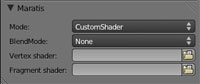
			<content type="html"><![CDATA[<p>You can export your mesh from Blender, there is a doc here : <a href="http://www.maratis3d.org/?p=277">http://www.maratis3d.org/?p=277</a></p><p>For custom shader it happen with this in Blender : <br /><span class="postimg"><img src="http://www.maratis3d.com/wp-content/uploads/2011/01/05.jpg" alt="http://www.maratis3d.com/wp-content/uploads/2011/01/05.jpg" /></span></p><p>Look at this page for more doc :<br /><a href="http://www.maratis3d.org/?page_id=53">http://www.maratis3d.org/?page_id=53</a></p>]]></content>
			<author>
				<name><![CDATA[anael]]></name>
				<uri>http://forum.maratis3d.com/profile.php?id=2</uri>
			</author>
			<updated>2012-08-29T12:52:25Z</updated>
			<id>http://forum.maratis3d.com/viewtopic.php?pid=2444#p2444</id>
		</entry>
		<entry>
			<title type="html"><![CDATA[Adding custom GLSL shader to all meshes on scene]]></title>
			<link rel="alternate" href="http://forum.maratis3d.com/viewtopic.php?pid=2442#p2442"/>
			<content type="html"><![CDATA[<p>Hello!<br />I&#039;m developing iOS app that uses maratis3d.<br />I want to add custom GLSL shader (vertex and fragment) to all my meshes.<br />How to do this best?<br />I have my models in 3ds format.<br />Thank you.</p>]]></content>
			<author>
				<name><![CDATA[Petr]]></name>
				<uri>http://forum.maratis3d.com/profile.php?id=1081</uri>
			</author>
			<updated>2012-08-29T12:43:12Z</updated>
			<id>http://forum.maratis3d.com/viewtopic.php?pid=2442#p2442</id>
		</entry>
</feed>
