<?xml version="1.0" encoding="utf-8"?>
<feed xmlns="http://www.w3.org/2005/Atom">
	<title type="html"><![CDATA[Maratis forum - Exporting texture]]></title>
	<link rel="self" href="http://forum.maratis3d.com/extern.php?action=feed&amp;tid=530&amp;type=atom"/>
	<updated>2013-01-10T20:49:45Z</updated>
	<generator>PunBB</generator>
	<id>http://forum.maratis3d.com/viewtopic.php?id=530</id>
		<entry>
			<title type="html"><![CDATA[Re: Exporting texture]]></title>
			<link rel="alternate" href="http://forum.maratis3d.com/viewtopic.php?pid=3326#p3326"/>
			<content type="html"><![CDATA[<p>Ooooooook! my frustration is over! I can finally export the textures correctly! <img src="http://forum.maratis3d.com/img/smilies/big_smile.png" width="15" height="15" alt="big_smile" /></p>]]></content>
			<author>
				<name><![CDATA[SadWolf]]></name>
				<uri>http://forum.maratis3d.com/profile.php?id=1268</uri>
			</author>
			<updated>2013-01-10T20:49:45Z</updated>
			<id>http://forum.maratis3d.com/viewtopic.php?pid=3326#p3326</id>
		</entry>
		<entry>
			<title type="html"><![CDATA[Re: Exporting texture]]></title>
			<link rel="alternate" href="http://forum.maratis3d.com/viewtopic.php?pid=3316#p3316"/>
			<content type="html"><![CDATA[<p>Ok!</p><p>Thank you for the little &quot;how-to&quot; <img src="http://forum.maratis3d.com/img/smilies/smile.png" width="15" height="15" alt="smile" /></p>]]></content>
			<author>
				<name><![CDATA[SadWolf]]></name>
				<uri>http://forum.maratis3d.com/profile.php?id=1268</uri>
			</author>
			<updated>2013-01-10T12:21:21Z</updated>
			<id>http://forum.maratis3d.com/viewtopic.php?pid=3316#p3316</id>
		</entry>
		<entry>
			<title type="html"><![CDATA[Re: Exporting texture]]></title>
			<link rel="alternate" href="http://forum.maratis3d.com/viewtopic.php?pid=3315#p3315"/>
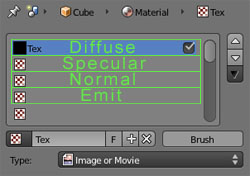
			<content type="html"><![CDATA[<p>Ok, there is multiple things that cause the problem,<br />in fact, if you launch a render from blender (F12), you&#039;ll see that the two textures doesn&#039;t show.</p><p>The first thing is because of the technique you used to assign multiple textures, it&#039;s something not very clear about Blender, there is two ways to apply multiple textures, the one you used is for blender internal engine using multitexturing. For exemple it&#039;s not used by Blender renderer or by the materials. I think it&#039;s something that should disappear from Blender.</p><p>So, the right way is to use materials, and in your case multi-materials, look at this tutorial : <a href="http://en.wikibooks.org/wiki/Blender_3D:_Noob_to_Pro/Multiple_Materials_Per_Object">http://en.wikibooks.org/wiki/Blender_3D &#133; Per_Object</a></p><p>To have a preview of what you are doing, press &#039;N&#039; in the 3d view, in the panel that opens, go to &#039;Display&#039; and select shading &#039;GLSL&#039;. In textured mode, you might need to add a lamp or it will be dark. Add also a bit of emit in your material (0.35 for example).</p><p>Then, follow this tutorial to create your material : <a href="http://www.maratis3d.org/?p=277">http://www.maratis3d.org/?p=277</a></p><p>specially this part for the order of the textures :</p><p><span class="postimg"><img src="http://www.maratis3d.com/wp-content/uploads/2011/01/07.jpg" alt="http://www.maratis3d.com/wp-content/uploads/2011/01/07.jpg" /></span></p>]]></content>
			<author>
				<name><![CDATA[anael]]></name>
				<uri>http://forum.maratis3d.com/profile.php?id=2</uri>
			</author>
			<updated>2013-01-10T12:16:38Z</updated>
			<id>http://forum.maratis3d.com/viewtopic.php?pid=3315#p3315</id>
		</entry>
		<entry>
			<title type="html"><![CDATA[Re: Exporting texture]]></title>
			<link rel="alternate" href="http://forum.maratis3d.com/viewtopic.php?pid=3313#p3313"/>
			<content type="html"><![CDATA[<p>Ok I&#039;m posting the mesh in a empty maratis project and the blender file</p><p><a href="http://www.misadev.com/maratisdemo/FloatingLand.rar">.mproj and .blend files</a></p><p>Standard Renderer<br /><span class="postimg"><img src="http://www.misadev.com/maratisdemo/standard.jpg" alt="http://www.misadev.com/maratisdemo/standard.jpg" /></span></p><p>Fixed Renderer<br /><span class="postimg"><img src="http://www.misadev.com/maratisdemo/fixed.jpg" alt="http://www.misadev.com/maratisdemo/fixed.jpg" /></span></p>]]></content>
			<author>
				<name><![CDATA[SadWolf]]></name>
				<uri>http://forum.maratis3d.com/profile.php?id=1268</uri>
			</author>
			<updated>2013-01-10T09:50:52Z</updated>
			<id>http://forum.maratis3d.com/viewtopic.php?pid=3313#p3313</id>
		</entry>
		<entry>
			<title type="html"><![CDATA[Re: Exporting texture]]></title>
			<link rel="alternate" href="http://forum.maratis3d.com/viewtopic.php?pid=3312#p3312"/>
			<content type="html"><![CDATA[<p>Here it is what iishappening...</p><p>I used two texture files!</p><p>In fixed mode it&#039;s using the first texture and in standard mode it&#039;s using the second texture....<br />that&#039;s why it looks so dark... because it was showing the texture for the bottom of the model!</p>]]></content>
			<author>
				<name><![CDATA[SadWolf]]></name>
				<uri>http://forum.maratis3d.com/profile.php?id=1268</uri>
			</author>
			<updated>2013-01-10T01:36:35Z</updated>
			<id>http://forum.maratis3d.com/viewtopic.php?pid=3312#p3312</id>
		</entry>
		<entry>
			<title type="html"><![CDATA[Re: Exporting texture]]></title>
			<link rel="alternate" href="http://forum.maratis3d.com/viewtopic.php?pid=3311#p3311"/>
			<content type="html"><![CDATA[<p>is it the smoothing that is not the same or is it just too dark ?</p><p>the radius of the lamp in maratis is not too small ?<br />you can also play with the diffuse color and the emit color in blender.</p>]]></content>
			<author>
				<name><![CDATA[anael]]></name>
				<uri>http://forum.maratis3d.com/profile.php?id=2</uri>
			</author>
			<updated>2013-01-10T00:27:49Z</updated>
			<id>http://forum.maratis3d.com/viewtopic.php?pid=3311#p3311</id>
		</entry>
		<entry>
			<title type="html"><![CDATA[Re: Exporting texture]]></title>
			<link rel="alternate" href="http://forum.maratis3d.com/viewtopic.php?pid=3310#p3310"/>
			<content type="html"><![CDATA[<p>Now I&#039;m getting this problem...</p><p>How it looks like with FixedRenderer:</p><p><span class="postimg"><img src="http://www.misadev.com/maratisdemo/landFixed.jpg" alt="PunBB bbcode test" /></span></p><p>How it looks like with StandardRenderer:<br /><span class="postimg"><img src="http://www.misadev.com/maratisdemo/landBlender.jpg" alt="PunBB bbcode test" /></span></p><p>How It looks like in Blender:<br /><span class="postimg"><img src="http://www.misadev.com/maratisdemo/landStand.jpg" alt="http://www.misadev.com/maratisdemo/landStand.jpg" /></span></p><p>The standard renderer is the closer one but I need to set it a big intensity level ( about 100 ) to make it look like.</p><p>:S&nbsp; I&#039;don&#039;t know what to do in this moment...</p>]]></content>
			<author>
				<name><![CDATA[SadWolf]]></name>
				<uri>http://forum.maratis3d.com/profile.php?id=1268</uri>
			</author>
			<updated>2013-01-09T23:49:13Z</updated>
			<id>http://forum.maratis3d.com/viewtopic.php?pid=3310#p3310</id>
		</entry>
		<entry>
			<title type="html"><![CDATA[Re: Exporting texture]]></title>
			<link rel="alternate" href="http://forum.maratis3d.com/viewtopic.php?pid=3305#p3305"/>
			<content type="html"><![CDATA[<div class="quotebox"><cite>anael wrote:</cite><blockquote><p>Yes it needs uv coordinates, but you can generate uv coordinates with the cube projection the result will be the same.</p><p>The good thing with the mesh format is that it can be read easily using a text or a xml editor, your method is correct.</p></blockquote></div><p>Thank you <img src="http://forum.maratis3d.com/img/smilies/smile.png" width="15" height="15" alt="smile" /> I think it&#039;s faster than opening blender and re-export everything</p>]]></content>
			<author>
				<name><![CDATA[SadWolf]]></name>
				<uri>http://forum.maratis3d.com/profile.php?id=1268</uri>
			</author>
			<updated>2013-01-09T22:58:13Z</updated>
			<id>http://forum.maratis3d.com/viewtopic.php?pid=3305#p3305</id>
		</entry>
		<entry>
			<title type="html"><![CDATA[Re: Exporting texture]]></title>
			<link rel="alternate" href="http://forum.maratis3d.com/viewtopic.php?pid=3304#p3304"/>
			<content type="html"><![CDATA[<p>Yes it needs uv coordinates, but you can generate uv coordinates with the cube projection the result will be the same.</p><p>The good thing with the mesh format is that it can be read easily using a text or a xml editor, your method is correct.</p>]]></content>
			<author>
				<name><![CDATA[anael]]></name>
				<uri>http://forum.maratis3d.com/profile.php?id=2</uri>
			</author>
			<updated>2013-01-09T22:55:03Z</updated>
			<id>http://forum.maratis3d.com/viewtopic.php?pid=3304#p3304</id>
		</entry>
		<entry>
			<title type="html"><![CDATA[Re: Exporting texture]]></title>
			<link rel="alternate" href="http://forum.maratis3d.com/viewtopic.php?pid=3303#p3303"/>
			<content type="html"><![CDATA[<p>Ok I using the UV Cordinate system and I give the same cordinate for all the faces <img src="http://forum.maratis3d.com/img/smilies/smile.png" width="15" height="15" alt="smile" /></p><p>PS: I&#039;m using this method to create cubes with different texture. <br />I created a cube.mesh then i copy&amp;paste it with another name and I change directly the path in .mesh file to another texture...</p>]]></content>
			<author>
				<name><![CDATA[SadWolf]]></name>
				<uri>http://forum.maratis3d.com/profile.php?id=1268</uri>
			</author>
			<updated>2013-01-09T22:34:01Z</updated>
			<id>http://forum.maratis3d.com/viewtopic.php?pid=3303#p3303</id>
		</entry>
		<entry>
			<title type="html"><![CDATA[Re: Exporting texture]]></title>
			<link rel="alternate" href="http://forum.maratis3d.com/viewtopic.php?pid=3302#p3302"/>
			<content type="html"><![CDATA[<p>Maybe I found the problem...<br />With UV cordinates everythings works fine...</p><p>I&#039;m not using the UV cordinate system for mapping the texture, I&#039;m using Global with Cube parameter to show the same texture on all the faces...<br />So the problem is that the exporter support only UV Cordinates...</p><p><img src="http://forum.maratis3d.com/img/smilies/sad.png" width="15" height="15" alt="sad" /> the other cordinates were so easy to make cubes, <br />with the UV cordinates I have to replicate the cube image face 6 time on the texture, right?<br />( this is a noob quesiton <img src="http://forum.maratis3d.com/img/smilies/big_smile.png" width="15" height="15" alt="big_smile" /> )</p>]]></content>
			<author>
				<name><![CDATA[SadWolf]]></name>
				<uri>http://forum.maratis3d.com/profile.php?id=1268</uri>
			</author>
			<updated>2013-01-09T22:21:49Z</updated>
			<id>http://forum.maratis3d.com/viewtopic.php?pid=3302#p3302</id>
		</entry>
		<entry>
			<title type="html"><![CDATA[Re: Exporting texture]]></title>
			<link rel="alternate" href="http://forum.maratis3d.com/viewtopic.php?pid=3301#p3301"/>
			<content type="html"><![CDATA[<div class="quotebox"><cite>SadWolf wrote:</cite><blockquote><p>@anael: the texture is in .jpg should I use .png?</p><p>Jpg is fine.</p><p>@zester: I&#039;m not using the UV mapping system... maybe that&#039;s the problem?</p></blockquote></div><p>That just might be the problem, also note that all objects need a material in-order to export them, atleast from my experance,<br />not sure what to do about &quot;emptys&quot; or if the same applyes for them also except you just make them invisible. Upload your model somewheres if you need any help ill look at it. I check the forums for new post often.</p>]]></content>
			<author>
				<name><![CDATA[zester]]></name>
				<uri>http://forum.maratis3d.com/profile.php?id=516</uri>
			</author>
			<updated>2013-01-09T22:17:07Z</updated>
			<id>http://forum.maratis3d.com/viewtopic.php?pid=3301#p3301</id>
		</entry>
		<entry>
			<title type="html"><![CDATA[Re: Exporting texture]]></title>
			<link rel="alternate" href="http://forum.maratis3d.com/viewtopic.php?pid=3300#p3300"/>
			<content type="html"><![CDATA[<p>@anael: the texture is in .jpg should I use .png?</p><p>@zester: I&#039;m not using the UV mapping system... maybe that&#039;s the problem?</p>]]></content>
			<author>
				<name><![CDATA[SadWolf]]></name>
				<uri>http://forum.maratis3d.com/profile.php?id=1268</uri>
			</author>
			<updated>2013-01-09T22:03:13Z</updated>
			<id>http://forum.maratis3d.com/viewtopic.php?pid=3300#p3300</id>
		</entry>
		<entry>
			<title type="html"><![CDATA[Re: Exporting texture]]></title>
			<link rel="alternate" href="http://forum.maratis3d.com/viewtopic.php?pid=3299#p3299"/>
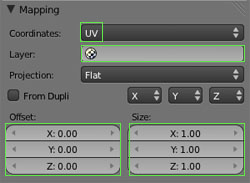
			<content type="html"><![CDATA[<p>I noticed in my meshs if I didnt set the &quot;Layer Option&quot; then my textures wouldnt show up sometimes.</p><p><span class="postimg"><img src="http://www.maratis3d.com/wp-content/uploads/2011/01/10.jpg" alt="http://www.maratis3d.com/wp-content/uploads/2011/01/10.jpg" /></span></p>]]></content>
			<author>
				<name><![CDATA[zester]]></name>
				<uri>http://forum.maratis3d.com/profile.php?id=516</uri>
			</author>
			<updated>2013-01-09T19:03:58Z</updated>
			<id>http://forum.maratis3d.com/viewtopic.php?pid=3299#p3299</id>
		</entry>
		<entry>
			<title type="html"><![CDATA[Re: Exporting texture]]></title>
			<link rel="alternate" href="http://forum.maratis3d.com/viewtopic.php?pid=3298#p3298"/>
			<content type="html"><![CDATA[<p>Hi,</p><p>did you follow the steps from the tutorial ? <a href="http://www.maratis3d.org/?p=277">http://www.maratis3d.org/?p=277</a></p><p>Is your texture already in your project/maps/ directory and is it a jpeg or a png ?</p>]]></content>
			<author>
				<name><![CDATA[anael]]></name>
				<uri>http://forum.maratis3d.com/profile.php?id=2</uri>
			</author>
			<updated>2013-01-09T18:33:04Z</updated>
			<id>http://forum.maratis3d.com/viewtopic.php?pid=3298#p3298</id>
		</entry>
</feed>