<?xml version="1.0" encoding="utf-8"?>
<feed xmlns="http://www.w3.org/2005/Atom">
	<title type="html"><![CDATA[Maratis forum - Creating 2D Cutouts for Maratis using Blender and Gimp (Grass Edition)]]></title>
	<link rel="self" href="http://forum.maratis3d.com/extern.php?action=feed&amp;tid=534&amp;type=atom"/>
	<updated>2013-01-18T01:34:41Z</updated>
	<generator>PunBB</generator>
	<id>http://forum.maratis3d.com/viewtopic.php?id=534</id>
		<entry>
			<title type="html"><![CDATA[Re: Creating 2D Cutouts for Maratis using Blender and Gimp (Grass Edition)]]></title>
			<link rel="alternate" href="http://forum.maratis3d.com/viewtopic.php?pid=3511#p3511"/>
			<content type="html"><![CDATA[<div class="quotebox"><cite>Wrapscallion wrote:</cite><blockquote><p>have no problem doing this in paint.net. I&#039;ll show some paint.net stuff this weekend. <img src="http://forum.maratis3d.com/img/smilies/smile.png" width="15" height="15" alt="smile" /> ( including the automatic normal map generator)</p></blockquote></div><p>That sounds like a great idea.</p>]]></content>
			<author>
				<name><![CDATA[zester]]></name>
				<uri>http://forum.maratis3d.com/profile.php?id=516</uri>
			</author>
			<updated>2013-01-18T01:34:41Z</updated>
			<id>http://forum.maratis3d.com/viewtopic.php?pid=3511#p3511</id>
		</entry>
		<entry>
			<title type="html"><![CDATA[Re: Creating 2D Cutouts for Maratis using Blender and Gimp (Grass Edition)]]></title>
			<link rel="alternate" href="http://forum.maratis3d.com/viewtopic.php?pid=3506#p3506"/>
			<content type="html"><![CDATA[<p>have no problem doing this in paint.net. I&#039;ll show some paint.net stuff this weekend. <img src="http://forum.maratis3d.com/img/smilies/smile.png" width="15" height="15" alt="smile" /> ( including the automatic normal map generator)</p>]]></content>
			<author>
				<name><![CDATA[Wrapscallion]]></name>
				<uri>http://forum.maratis3d.com/profile.php?id=1085</uri>
			</author>
			<updated>2013-01-17T23:39:51Z</updated>
			<id>http://forum.maratis3d.com/viewtopic.php?pid=3506#p3506</id>
		</entry>
		<entry>
			<title type="html"><![CDATA[Re: Creating 2D Cutouts for Maratis using Blender and Gimp (Grass Edition)]]></title>
			<link rel="alternate" href="http://forum.maratis3d.com/viewtopic.php?pid=3447#p3447"/>
			<content type="html"><![CDATA[<div class="quotebox"><cite>Vegas wrote:</cite><blockquote><p>Yup indeed, that image is a low res 1600x1200, that should be that <img src="http://forum.maratis3d.com/img/smilies/hmm.png" width="15" height="15" alt="hmm" /><br />oh well, at last it&#039;s good to know this alpha trick in gimp, thanks guys <img src="http://forum.maratis3d.com/img/smilies/smile.png" width="15" height="15" alt="smile" /></p></blockquote></div><p>1600x1200 shouldnt be giving any major problems. </p><p>This is 600x600</p><p><span class="postimg"><img src="https://lh3.googleusercontent.com/-dObxnbQWWDU/UPXoPXsYK1I/AAAAAAAAAxM/NZx_Ih1t6Nw/s800/Capture11.png" alt="https://lh3.googleusercontent.com/-dObxnbQWWDU/UPXoPXsYK1I/AAAAAAAAAxM/NZx_Ih1t6Nw/s800/Capture11.png" /></span><br /><span class="postimg"><img src="https://lh3.googleusercontent.com/-rycFy68k97I/UPXoSSSc1xI/AAAAAAAAAxU/WE4Rp0HNOeA/s800/Capture12.png" alt="https://lh3.googleusercontent.com/-rycFy68k97I/UPXoSSSc1xI/AAAAAAAAAxU/WE4Rp0HNOeA/s800/Capture12.png" /></span></p><p>I will just go around it with the eraser and then smooth the edges and fix the missing pixels with the clone tool. Cutouts are 90% of the time alot of work.</p>]]></content>
			<author>
				<name><![CDATA[zester]]></name>
				<uri>http://forum.maratis3d.com/profile.php?id=516</uri>
			</author>
			<updated>2013-01-15T23:40:01Z</updated>
			<id>http://forum.maratis3d.com/viewtopic.php?pid=3447#p3447</id>
		</entry>
		<entry>
			<title type="html"><![CDATA[Re: Creating 2D Cutouts for Maratis using Blender and Gimp (Grass Edition)]]></title>
			<link rel="alternate" href="http://forum.maratis3d.com/viewtopic.php?pid=3446#p3446"/>
			<content type="html"><![CDATA[<p>Yup indeed, that image is a low res 1600x1200, that should be that <img src="http://forum.maratis3d.com/img/smilies/hmm.png" width="15" height="15" alt="hmm" /><br />oh well, at last it&#039;s good to know this alpha trick in gimp, thanks guys <img src="http://forum.maratis3d.com/img/smilies/smile.png" width="15" height="15" alt="smile" /></p>]]></content>
			<author>
				<name><![CDATA[Vegas]]></name>
				<uri>http://forum.maratis3d.com/profile.php?id=53</uri>
			</author>
			<updated>2013-01-15T23:31:40Z</updated>
			<id>http://forum.maratis3d.com/viewtopic.php?pid=3446#p3446</id>
		</entry>
		<entry>
			<title type="html"><![CDATA[Re: Creating 2D Cutouts for Maratis using Blender and Gimp (Grass Edition)]]></title>
			<link rel="alternate" href="http://forum.maratis3d.com/viewtopic.php?pid=3445#p3445"/>
			<content type="html"><![CDATA[<div class="quotebox"><cite>Vegas wrote:</cite><blockquote><p>It&#039;s just below your last picture =p</p></blockquote></div><p>Do you have the original the ones you posted are screenshots and have the checkered background. Also if your image is to low of a resolution then the method anael posted wont work and just make it worse. You would have to manualy doctor the image to get it to look right. My leafs are freaking hugh just look at the resolution on the window titlebar for gimp 3295x5000. If you printed that thing out you could make a life size leaf cape.</p>]]></content>
			<author>
				<name><![CDATA[zester]]></name>
				<uri>http://forum.maratis3d.com/profile.php?id=516</uri>
			</author>
			<updated>2013-01-15T23:13:14Z</updated>
			<id>http://forum.maratis3d.com/viewtopic.php?pid=3445#p3445</id>
		</entry>
		<entry>
			<title type="html"><![CDATA[Re: Creating 2D Cutouts for Maratis using Blender and Gimp (Grass Edition)]]></title>
			<link rel="alternate" href="http://forum.maratis3d.com/viewtopic.php?pid=3444#p3444"/>
			<content type="html"><![CDATA[<p>It&#039;s just below your last picture =p</p>]]></content>
			<author>
				<name><![CDATA[Vegas]]></name>
				<uri>http://forum.maratis3d.com/profile.php?id=53</uri>
			</author>
			<updated>2013-01-15T23:08:53Z</updated>
			<id>http://forum.maratis3d.com/viewtopic.php?pid=3444#p3444</id>
		</entry>
		<entry>
			<title type="html"><![CDATA[Re: Creating 2D Cutouts for Maratis using Blender and Gimp (Grass Edition)]]></title>
			<link rel="alternate" href="http://forum.maratis3d.com/viewtopic.php?pid=3443#p3443"/>
			<content type="html"><![CDATA[<div class="quotebox"><cite>Vegas wrote:</cite><blockquote><p>What the hell ? Why is mine all crappy <img src="http://forum.maratis3d.com/img/smilies/sad.png" width="15" height="15" alt="sad" /></p></blockquote></div><p>lol post your image let me look.</p>]]></content>
			<author>
				<name><![CDATA[zester]]></name>
				<uri>http://forum.maratis3d.com/profile.php?id=516</uri>
			</author>
			<updated>2013-01-15T23:04:58Z</updated>
			<id>http://forum.maratis3d.com/viewtopic.php?pid=3443#p3443</id>
		</entry>
		<entry>
			<title type="html"><![CDATA[Re: Creating 2D Cutouts for Maratis using Blender and Gimp (Grass Edition)]]></title>
			<link rel="alternate" href="http://forum.maratis3d.com/viewtopic.php?pid=3442#p3442"/>
			<content type="html"><![CDATA[<p>What the hell ? Why is mine all crappy <img src="http://forum.maratis3d.com/img/smilies/sad.png" width="15" height="15" alt="sad" /></p>]]></content>
			<author>
				<name><![CDATA[Vegas]]></name>
				<uri>http://forum.maratis3d.com/profile.php?id=53</uri>
			</author>
			<updated>2013-01-15T23:03:59Z</updated>
			<id>http://forum.maratis3d.com/viewtopic.php?pid=3442#p3442</id>
		</entry>
		<entry>
			<title type="html"><![CDATA[Re: Creating 2D Cutouts for Maratis using Blender and Gimp (Grass Edition)]]></title>
			<link rel="alternate" href="http://forum.maratis3d.com/viewtopic.php?pid=3441#p3441"/>
			<content type="html"><![CDATA[<p>This is what I get from the link anael posted.</p><p><span class="postimg"><img src="https://lh5.googleusercontent.com/-ht7Jtb8BDZg/UPXfJJzT8uI/AAAAAAAAAws/HnEP70WupOA/s800/Capture8.png" alt="https://lh5.googleusercontent.com/-ht7Jtb8BDZg/UPXfJJzT8uI/AAAAAAAAAws/HnEP70WupOA/s800/Capture8.png" /></span><br /><span class="postimg"><img src="https://lh5.googleusercontent.com/-ufzDWevdXRI/UPXf6yEkCuI/AAAAAAAAAw4/pgykOa22c8g/s800/Capture9.png" alt="https://lh5.googleusercontent.com/-ufzDWevdXRI/UPXf6yEkCuI/AAAAAAAAAw4/pgykOa22c8g/s800/Capture9.png" /></span></p><p>Fixed that weird haze problem also.</p><p>Thanks anael <img src="http://forum.maratis3d.com/img/smilies/wink.png" width="15" height="15" alt="wink" /></p>]]></content>
			<author>
				<name><![CDATA[zester]]></name>
				<uri>http://forum.maratis3d.com/profile.php?id=516</uri>
			</author>
			<updated>2013-01-15T23:00:44Z</updated>
			<id>http://forum.maratis3d.com/viewtopic.php?pid=3441#p3441</id>
		</entry>
		<entry>
			<title type="html"><![CDATA[Re: Creating 2D Cutouts for Maratis using Blender and Gimp (Grass Edition)]]></title>
			<link rel="alternate" href="http://forum.maratis3d.com/viewtopic.php?pid=3440#p3440"/>
			<content type="html"><![CDATA[<p>Hmm verious settings from a single image w/o layers :</p><p><span class="postimg"><img src="https://dl.dropbox.com/u/19970067/Pictures/MaraForum/GimpThreshold.png" alt="PunBB bbcode test" /></span></p>]]></content>
			<author>
				<name><![CDATA[Vegas]]></name>
				<uri>http://forum.maratis3d.com/profile.php?id=53</uri>
			</author>
			<updated>2013-01-15T22:57:32Z</updated>
			<id>http://forum.maratis3d.com/viewtopic.php?pid=3440#p3440</id>
		</entry>
		<entry>
			<title type="html"><![CDATA[Re: Creating 2D Cutouts for Maratis using Blender and Gimp (Grass Edition)]]></title>
			<link rel="alternate" href="http://forum.maratis3d.com/viewtopic.php?pid=3438#p3438"/>
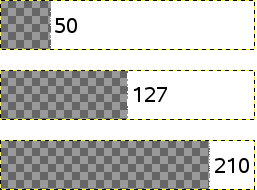
			<content type="html"><![CDATA[<div class="quotebox"><cite>anael wrote:</cite><blockquote><p>For gimp I found something about the alpha (in french) : <a href="http://docs.gimp.org/fr/plug-in-threshold-alpha.html">http://docs.gimp.org/fr/plug-in-threshold-alpha.html</a></p></blockquote></div><p>7.37. Alpha level</p><p>Converts the alpha threshold regions partially transparent areas of the active layer completely transparent or opaque. The user specifies an alpha level (0 ... 255) which will be used to separate the regions that will become clear to those who may become opaque. This only works on RGB images with an alpha channel. If the option Keep transparency is checked in the Layers dialog, this command will cause an error message.</p><p>7.37.1. Access control<br />You can access this command from the image menubar through Layer → Transparency → Alpha Threshold .</p><p>7.37.2. Description of the dialog</p><p>&nbsp; &nbsp; Figure 16101. The only option dialog &quot;&nbsp; Threshold Alpha&nbsp; &quot;<br />&nbsp; &nbsp; <span class="postimg"><img src="http://docs.gimp.org/fr/images/menus/layer/threshold-alpha.png" alt="http://docs.gimp.org/fr/images/menus/layer/threshold-alpha.png" /></span></p><p>Threshold<br />With this option, you can set the transparency value to be used as threshold. You can do this using a slider or by entering a value in the text box, between 0 and 255. All transparency values above this threshold will be made opaque and values below this threshold will be made completely transparent. The transition is abrupt.</p><p>Note<br />This command will never completely transparent (alpha value = 0) opaque pixels.</p><p>Figure 16102. Example Threshold Alpha</p><br /><p>A transparency gradient 0-255<br /><span class="postimg"><img src="http://docs.gimp.org/fr/images/menus/layer/threshold-alpha-example.png" alt="http://docs.gimp.org/fr/images/menus/layer/threshold-alpha-example.png" /></span></p><p>Alpha level set at 50, 127, 210<br /><span class="postimg"><img src="http://docs.gimp.org/fr/images/menus/layer/threshold-alpha-example3.png" alt="http://docs.gimp.org/fr/images/menus/layer/threshold-alpha-example3.png" /></span></p>]]></content>
			<author>
				<name><![CDATA[zester]]></name>
				<uri>http://forum.maratis3d.com/profile.php?id=516</uri>
			</author>
			<updated>2013-01-15T22:40:34Z</updated>
			<id>http://forum.maratis3d.com/viewtopic.php?pid=3438#p3438</id>
		</entry>
		<entry>
			<title type="html"><![CDATA[Re: Creating 2D Cutouts for Maratis using Blender and Gimp (Grass Edition)]]></title>
			<link rel="alternate" href="http://forum.maratis3d.com/viewtopic.php?pid=3432#p3432"/>
			<content type="html"><![CDATA[<p>For gimp I found something about the alpha (in french) : <a href="http://docs.gimp.org/fr/plug-in-threshold-alpha.html">http://docs.gimp.org/fr/plug-in-threshold-alpha.html</a></p>]]></content>
			<author>
				<name><![CDATA[anael]]></name>
				<uri>http://forum.maratis3d.com/profile.php?id=2</uri>
			</author>
			<updated>2013-01-15T22:24:08Z</updated>
			<id>http://forum.maratis3d.com/viewtopic.php?pid=3432#p3432</id>
		</entry>
		<entry>
			<title type="html"><![CDATA[Re: Creating 2D Cutouts for Maratis using Blender and Gimp (Grass Edition)]]></title>
			<link rel="alternate" href="http://forum.maratis3d.com/viewtopic.php?pid=3427#p3427"/>
			<content type="html"><![CDATA[<div class="quotebox"><cite>Vegas wrote:</cite><blockquote><p>Hmm there&#039;s still some transparency on the final image, the edges of the main grass/vegetation are also a bit weird <img src="http://forum.maratis3d.com/img/smilies/hmm.png" width="15" height="15" alt="hmm" /></p><p>I deceided to try my luck with imagemagick, i&#039;m making a script that automates everything (masking,alpha and combining) it&#039;s almost done, only one small problem to correct and it&#039;s a one-click win <img src="http://forum.maratis3d.com/img/smilies/wink.png" width="15" height="15" alt="wink" />&nbsp; </p><p>Gonna post it here once it&#039;s ready, could be an alternate method</p></blockquote></div><p>Looking forward to trying that out. One click win sounds good!!! lol <img src="http://forum.maratis3d.com/img/smilies/wink.png" width="15" height="15" alt="wink" /></p><p>Mine dont always turn out perfect eather, I get this weird haze around my image especialy if I use the lasso tool. Sometimes I have to fix the transparent or missing parts with the clone brush. But for me its generaly worth it.</p>]]></content>
			<author>
				<name><![CDATA[zester]]></name>
				<uri>http://forum.maratis3d.com/profile.php?id=516</uri>
			</author>
			<updated>2013-01-15T22:14:22Z</updated>
			<id>http://forum.maratis3d.com/viewtopic.php?pid=3427#p3427</id>
		</entry>
		<entry>
			<title type="html"><![CDATA[Re: Creating 2D Cutouts for Maratis using Blender and Gimp (Grass Edition)]]></title>
			<link rel="alternate" href="http://forum.maratis3d.com/viewtopic.php?pid=3424#p3424"/>
			<content type="html"><![CDATA[<p>Hmm there&#039;s still some transparency on the final image, the edges of the main grass/vegetation are also a bit weird <img src="http://forum.maratis3d.com/img/smilies/hmm.png" width="15" height="15" alt="hmm" /></p><p>I deceided to try my luck with imagemagick, i&#039;m making a script that automates everything (masking,alpha and combining) it&#039;s almost done, only one small problem to correct and it&#039;s a one-click win <img src="http://forum.maratis3d.com/img/smilies/wink.png" width="15" height="15" alt="wink" />&nbsp; </p><p>Gonna post it here once it&#039;s ready, could be an alternate method</p>]]></content>
			<author>
				<name><![CDATA[Vegas]]></name>
				<uri>http://forum.maratis3d.com/profile.php?id=53</uri>
			</author>
			<updated>2013-01-15T21:48:30Z</updated>
			<id>http://forum.maratis3d.com/viewtopic.php?pid=3424#p3424</id>
		</entry>
		<entry>
			<title type="html"><![CDATA[Re: Creating 2D Cutouts for Maratis using Blender and Gimp (Grass Edition)]]></title>
			<link rel="alternate" href="http://forum.maratis3d.com/viewtopic.php?pid=3406#p3406"/>
			<content type="html"><![CDATA[<p>You can also try duplicating the layer a couple of times and merging those copys to gether thats what I do most of the time, it seams to workout fine.</p>]]></content>
			<author>
				<name><![CDATA[zester]]></name>
				<uri>http://forum.maratis3d.com/profile.php?id=516</uri>
			</author>
			<updated>2013-01-15T14:35:04Z</updated>
			<id>http://forum.maratis3d.com/viewtopic.php?pid=3406#p3406</id>
		</entry>
</feed>