<?xml version="1.0" encoding="utf-8"?>
<feed xmlns="http://www.w3.org/2005/Atom">
	<title type="html"><![CDATA[Maratis forum - Few questions]]></title>
	<link rel="self" href="http://forum.maratis3d.com/extern.php?action=feed&amp;tid=60&amp;type=atom"/>
	<updated>2011-10-31T16:12:19Z</updated>
	<generator>PunBB</generator>
	<id>http://forum.maratis3d.com/viewtopic.php?id=60</id>
		<entry>
			<title type="html"><![CDATA[Re: Few questions]]></title>
			<link rel="alternate" href="http://forum.maratis3d.com/viewtopic.php?pid=792#p792"/>
			<content type="html"><![CDATA[<div class="quotebox"><cite>Vegas wrote:</cite><blockquote><p> for my previous problem with&nbsp; car / angular factor and weird collisions, </p><p>It was because i tried to make the car moving like a normal character (like in yofrankie with a player bounding box)<br />I completely forgot your PhysicsTest level in Demos, tried with that and theres no problem at all -.-</p></blockquote></div><p>At least on a single flat plane <img src="http://forum.maratis3d.com/img/smilies/hmm.png" width="15" height="15" alt="hmm" /><br />Still have problems on assembled meshes.<br />I uploaded the project : <a href="http://dl.dropbox.com/u/19970067/Questions/Drive.rar">http://dl.dropbox.com/u/19970067/Questions/Drive.rar</a><br />It contains the car (exactly like in your example, and a flat road)</p>]]></content>
			<author>
				<name><![CDATA[Vegas]]></name>
				<uri>http://forum.maratis3d.com/profile.php?id=53</uri>
			</author>
			<updated>2011-10-31T16:12:19Z</updated>
			<id>http://forum.maratis3d.com/viewtopic.php?pid=792#p792</id>
		</entry>
		<entry>
			<title type="html"><![CDATA[Re: Few questions]]></title>
			<link rel="alternate" href="http://forum.maratis3d.com/viewtopic.php?pid=732#p732"/>
			<content type="html"><![CDATA[<p>Great, thanks <img src="http://forum.maratis3d.com/img/smilies/smile.png" width="15" height="15" alt="smile" /></p><p>Also, nothing to do with that but, for my previous problem with&nbsp; car / angular factor and weird collisions, </p><p>It was because i tried to make the car moving like a normal character (like in yofrankie with a player bounding box)<br />I completely forgot your PhysicsTest level in Demos, tried with that and theres no problem at all -.-</p>]]></content>
			<author>
				<name><![CDATA[Vegas]]></name>
				<uri>http://forum.maratis3d.com/profile.php?id=53</uri>
			</author>
			<updated>2011-10-14T17:24:45Z</updated>
			<id>http://forum.maratis3d.com/viewtopic.php?pid=732#p732</id>
		</entry>
		<entry>
			<title type="html"><![CDATA[Re: Few questions]]></title>
			<link rel="alternate" href="http://forum.maratis3d.com/viewtopic.php?pid=730#p730"/>
			<content type="html"><![CDATA[<p>If your behavior is the first on the list, behaviorId will be 0, the second will be 1 etc<br />&quot;variable name&quot; will be &quot;target&quot; for the LookAt behavior, and then you can set the variable.</p><p>try :<br />setBehaviorVariable(camera, 0, &quot;target&quot;, &quot;object2&quot;)</p><br /><br /><p>Alinor : I don&#039;t remember if we talked about your question, for the transparent effect, you can play with the &quot;opacity&quot; value of the object material. If your object is an instance (if the mesh is used by multiple entities) you&#039;ll have to make a copy of the mesh for each entity (in the constructor of the behavior for example).</p>]]></content>
			<author>
				<name><![CDATA[anael]]></name>
				<uri>http://forum.maratis3d.com/profile.php?id=2</uri>
			</author>
			<updated>2011-10-14T09:17:00Z</updated>
			<id>http://forum.maratis3d.com/viewtopic.php?pid=730#p730</id>
		</entry>
		<entry>
			<title type="html"><![CDATA[Re: Few questions]]></title>
			<link rel="alternate" href="http://forum.maratis3d.com/viewtopic.php?pid=729#p729"/>
			<content type="html"><![CDATA[<p>Hi, i need a quick tip on :</p><p>getBehaviorVariable(object, behaviorId, « variableName »)<br />setBehaviorVariable(object, behaviorId, « variableName », value)</p><p>Im trying to make some kind of waypoints with the LookAt behavior for entities,<br />The idea is : </p><p>&quot;box&quot; with LookAt on object1<br />when &quot;box&quot; has reached object1, LookAt target change to object2<br />and so on.</p><p>But for now in all my tests theres no changes at all so i must do something wrong</p>]]></content>
			<author>
				<name><![CDATA[Vegas]]></name>
				<uri>http://forum.maratis3d.com/profile.php?id=53</uri>
			</author>
			<updated>2011-10-14T00:59:59Z</updated>
			<id>http://forum.maratis3d.com/viewtopic.php?pid=729#p729</id>
		</entry>
		<entry>
			<title type="html"><![CDATA[Re: Few questions]]></title>
			<link rel="alternate" href="http://forum.maratis3d.com/viewtopic.php?pid=616#p616"/>
			<content type="html"><![CDATA[<p>Hi I have also some generals questions :</p><p>About engine c++ :</p><p>I have some probleme with the function &quot;bool onKeydown(* char)&quot; with keyboard symbols : the effect in maratis is quite similar to &quot;bool isKeyPressed(* char)&quot;, I think that I should maybe use &quot;void flush(void)&quot; but I don&#039;t know how do it ...</p><p>About graphism :</p><p>can we create a function c++ who render a texture progressively transparent and finally set the visibilty of the object on &quot;off&quot; (using the function &quot;setInvisible&quot; (to erase object too far from the camera&nbsp; for example) <img src="http://forum.maratis3d.com/img/smilies/wink.png" width="15" height="15" alt="wink" /></p>]]></content>
			<author>
				<name><![CDATA[Alinor]]></name>
				<uri>http://forum.maratis3d.com/profile.php?id=64</uri>
			</author>
			<updated>2011-09-13T17:49:37Z</updated>
			<id>http://forum.maratis3d.com/viewtopic.php?pid=616#p616</id>
		</entry>
		<entry>
			<title type="html"><![CDATA[Re: Few questions]]></title>
			<link rel="alternate" href="http://forum.maratis3d.com/viewtopic.php?pid=602#p602"/>
			<content type="html"><![CDATA[<p>Hmm writing GLSL shaders is out of my range, but nevermind, your method should be ok for what i&#039;m trying to do<br />I was also thinking about put my object inside of a box (along with camera), toy around with double sided and see if it blocks the light</p><p>Thanks</p>]]></content>
			<author>
				<name><![CDATA[Vegas]]></name>
				<uri>http://forum.maratis3d.com/profile.php?id=53</uri>
			</author>
			<updated>2011-09-12T11:50:10Z</updated>
			<id>http://forum.maratis3d.com/viewtopic.php?pid=602#p602</id>
		</entry>
		<entry>
			<title type="html"><![CDATA[Re: Few questions]]></title>
			<link rel="alternate" href="http://forum.maratis3d.com/viewtopic.php?pid=576#p576"/>
			<content type="html"><![CDATA[<p>ok, I taught it was fixed renderer.<br />With a standard material, you can do :<br />emit = 1.0<br />diffuse = white (1, 1, 1) WARNING : don&#039;t forget the intensity factor set to 1.0<br />specular intensity = 0</p><p>This globally works,<br />but if you want something perfect, the best it to do a custom glsl shader.</p>]]></content>
			<author>
				<name><![CDATA[anael]]></name>
				<uri>http://forum.maratis3d.com/profile.php?id=2</uri>
			</author>
			<updated>2011-09-09T17:22:03Z</updated>
			<id>http://forum.maratis3d.com/viewtopic.php?pid=576#p576</id>
		</entry>
		<entry>
			<title type="html"><![CDATA[Re: Few questions]]></title>
			<link rel="alternate" href="http://forum.maratis3d.com/viewtopic.php?pid=575#p575"/>
			<content type="html"><![CDATA[<p>The best i can get is a very bright (emit only) or very dark object (playing with diffuse,specular,hardness), but its still affected by light</p><p>Just to make sure, <br />I want that object to be shadeless in maratis with standard renderer (in the game), not fixed renderer</p>]]></content>
			<author>
				<name><![CDATA[Vegas]]></name>
				<uri>http://forum.maratis3d.com/profile.php?id=53</uri>
			</author>
			<updated>2011-09-09T13:44:29Z</updated>
			<id>http://forum.maratis3d.com/viewtopic.php?pid=575#p575</id>
		</entry>
		<entry>
			<title type="html"><![CDATA[Re: Few questions]]></title>
			<link rel="alternate" href="http://forum.maratis3d.com/viewtopic.php?pid=573#p573"/>
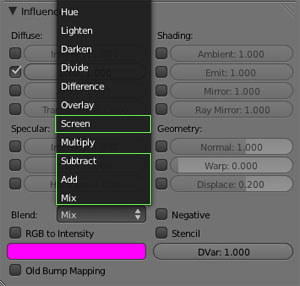
			<content type="html"><![CDATA[<p>you see the &quot;Emit&quot; value in &quot;Shading&quot; (in your right screenshot) is &quot;0.0&quot;, set it to &quot;1.0&quot;.</p><p>The &quot;Influence&quot; settings are not used in Maratis, exept the &quot;Blend&quot; :<br /><span class="postimg"><img src="http://www.maratis3d.com/wp-content/uploads/2011/01/11.jpg" alt="http://www.maratis3d.com/wp-content/uploads/2011/01/11.jpg" /></span></p>]]></content>
			<author>
				<name><![CDATA[anael]]></name>
				<uri>http://forum.maratis3d.com/profile.php?id=2</uri>
			</author>
			<updated>2011-09-09T10:00:34Z</updated>
			<id>http://forum.maratis3d.com/viewtopic.php?pid=573#p573</id>
		</entry>
		<entry>
			<title type="html"><![CDATA[Re: Few questions]]></title>
			<link rel="alternate" href="http://forum.maratis3d.com/viewtopic.php?pid=569#p569"/>
			<content type="html"><![CDATA[<div class="quotebox"><cite>anael wrote:</cite><blockquote><p>this doesn&#039;t work ?<br />fov = getCameraFov(Camera0)<br />setCameraFov(Camera0, fov+1)</p></blockquote></div><p>Damnit xD thats probably the only thing i didnt tried, and thats working ! thank you<br />Also thanks Alinor but C++ is like chinese for me, i dont even know where to put that :x</p><p>For joystick, it didnt fix the problem, i will try to recalibrate later on but<br />i doubt thats the prob, as im playing alot of games with my gamepad and never had that problem</p><p>And lastly, about shadeless objects, when you say set Emit to white, is just apply a texture like this or something else ?<br /><span class="postimg"><img src="http://dl.dropbox.com/u/19970067/MaratisShots/screenshot.b1.png" alt="PunBB bbcode test" /></span>-<span class="postimg"><img src="http://dl.dropbox.com/u/19970067/MaratisShots/screenshot.b2.png" alt="PunBB bbcode test" /></span></p><p>I tried about 1hour with many differents options but its still not shadeless<br />i need some more info :x</p>]]></content>
			<author>
				<name><![CDATA[Vegas]]></name>
				<uri>http://forum.maratis3d.com/profile.php?id=53</uri>
			</author>
			<updated>2011-09-08T17:38:22Z</updated>
			<id>http://forum.maratis3d.com/viewtopic.php?pid=569#p569</id>
		</entry>
		<entry>
			<title type="html"><![CDATA[Re: Few questions]]></title>
			<link rel="alternate" href="http://forum.maratis3d.com/viewtopic.php?pid=568#p568"/>
			<content type="html"><![CDATA[<p>an other way to zoom is to move closer the camera and the object <img src="http://forum.maratis3d.com/img/smilies/wink.png" width="15" height="15" alt="wink" /></p><p>Here a very basic example in c++ (sorry I am not very good in Lua)<br /></p><div class="codebox"><pre><code>float zoomSpeed = 1.0; // the zoom speed
MOEntity* camera, cible; 
MVector3 vector = cible-&gt;getPosition() - camera-&gt;getPosition();
vector.getNormalize()*= zoomSpeed;
camera-&gt;setPosition(camera-&gt;getPosition()+vector);</code></pre></div><p>I wish that this could help you <img src="http://forum.maratis3d.com/img/smilies/wink.png" width="15" height="15" alt="wink" /></p>]]></content>
			<author>
				<name><![CDATA[Alinor]]></name>
				<uri>http://forum.maratis3d.com/profile.php?id=64</uri>
			</author>
			<updated>2011-09-08T07:50:35Z</updated>
			<id>http://forum.maratis3d.com/viewtopic.php?pid=568#p568</id>
		</entry>
		<entry>
			<title type="html"><![CDATA[Re: Few questions]]></title>
			<link rel="alternate" href="http://forum.maratis3d.com/viewtopic.php?pid=567#p567"/>
			<content type="html"><![CDATA[<p>this doesn&#039;t work ?<br />fov = getCameraFov(Camera0)<br />setCameraFov(Camera0, fov+1)</p><p>- Using the standard renderer, you can set the emit color to white for an object not affected by light.</p><p>- For the joystick, maybe you didn&#039;t calibrated it precisely (windows config pannel) ?</p><p>Or you can try to change this part in the script :</p><p>if dx &gt; -0.2 and dx &lt; 0.2 then dx = 0 end<br />if dy &gt; -0.2 and dy &lt; 0.2 then dy = 0 end<br />if dz &gt; -0.2 and dz &lt; 0.2 then dz = 0 end<br />if dw &gt; -0.2 and dw &lt; 0.2 then dw = 0 end</p><p>try using a&nbsp; number bigger than 0.2 maybe.</p>]]></content>
			<author>
				<name><![CDATA[anael]]></name>
				<uri>http://forum.maratis3d.com/profile.php?id=2</uri>
			</author>
			<updated>2011-09-08T07:38:50Z</updated>
			<id>http://forum.maratis3d.com/viewtopic.php?pid=567#p567</id>
		</entry>
		<entry>
			<title type="html"><![CDATA[Re: Few questions]]></title>
			<link rel="alternate" href="http://forum.maratis3d.com/viewtopic.php?pid=563#p563"/>
			<content type="html"><![CDATA[<p>Hi, some other questions :</p><p><strong>Camera FOV</strong></p><p>I&#039;m trying to make a zoom but i cant get camera fov changes working like &quot;t = t + 1&quot; stuff.<br />I tried many thing also with getCameraFov and also setCameraFov(Camera0, 60+1) but it doesnt matter what i do,<br />with 60 + 1 only +1 is applied and only one time (cant loop it)</p><p>Also i tried with a timer:</p><p>if t == 1 then<br />&nbsp; &nbsp; setCameraFov(Camera0, 61)<br />end</p><p>if t == 2 then<br />&nbsp; &nbsp; setCameraFov(Camera0, 62)<br />end</p><p>and so on, this one is working, but i doubt thats a good way to do :x</p><p><strong>Shadeless materials</strong></p><p>Is it possible to have a object not affected by light using the standard renderer ?</p><p><strong>SponzaFPS with a gamepad</strong></p><p>Tried the example with gamepad script but the view starts and never end to rotate (Z axis) just after i launch the game, any idea how to fix this ? (im using a PS2 gamepad)</p>]]></content>
			<author>
				<name><![CDATA[Vegas]]></name>
				<uri>http://forum.maratis3d.com/profile.php?id=53</uri>
			</author>
			<updated>2011-09-07T22:05:55Z</updated>
			<id>http://forum.maratis3d.com/viewtopic.php?pid=563#p563</id>
		</entry>
		<entry>
			<title type="html"><![CDATA[Re: Few questions]]></title>
			<link rel="alternate" href="http://forum.maratis3d.com/viewtopic.php?pid=524#p524"/>
			<content type="html"><![CDATA[<p>Thanks, this time it&#039;s work <img src="http://forum.maratis3d.com/img/smilies/wink.png" width="15" height="15" alt="wink" /></p>]]></content>
			<author>
				<name><![CDATA[Alinor]]></name>
				<uri>http://forum.maratis3d.com/profile.php?id=64</uri>
			</author>
			<updated>2011-08-27T13:38:18Z</updated>
			<id>http://forum.maratis3d.com/viewtopic.php?pid=524#p524</id>
		</entry>
		<entry>
			<title type="html"><![CDATA[Re: Few questions]]></title>
			<link rel="alternate" href="http://forum.maratis3d.com/viewtopic.php?pid=523#p523"/>
			<content type="html"><![CDATA[<p>LoadLevel should be called only from the MGame class, because behaviors are parts of a level scene so it can cause crashes if it is called in the middle of the level update.</p><p>Use the same code you wrote in a custom MGame class at the end of the MGame::update() function. It should work.</p>]]></content>
			<author>
				<name><![CDATA[anael]]></name>
				<uri>http://forum.maratis3d.com/profile.php?id=2</uri>
			</author>
			<updated>2011-08-27T12:48:15Z</updated>
			<id>http://forum.maratis3d.com/viewtopic.php?pid=523#p523</id>
		</entry>
</feed>