<?xml version="1.0" encoding="utf-8"?>
<feed xmlns="http://www.w3.org/2005/Atom">
	<title type="html"><![CDATA[Maratis forum - Terrain Creation and Texture Painting Tutorial]]></title>
	<link rel="self" href="http://forum.maratis3d.com/extern.php?action=feed&amp;tid=813&amp;type=atom"/>
	<updated>2013-10-25T23:56:51Z</updated>
	<generator>PunBB</generator>
	<id>http://forum.maratis3d.com/viewtopic.php?id=813</id>
		<entry>
			<title type="html"><![CDATA[Re: Terrain Creation and Texture Painting Tutorial]]></title>
			<link rel="alternate" href="http://forum.maratis3d.com/viewtopic.php?pid=5815#p5815"/>
			<content type="html"><![CDATA[<p>Experimenting with creating terrains, using Dynamic Topology in &quot;Sculpting Mode&quot;. This I would use for really detailed terrains something you might see in a AAA game.</p><p>What Dynamic Topology does is it only add&#039;s geometry to the parts of a mesh that you sculpt, this decreases the poly count dramatically.</p><p>Once you are done sculpting you would then create a new lowpoly mesh using a method called retopology, or retop.</p><p>Then we would/should be able to bake a normalmap and AO map and apply that to our lowpoly retop mesh.</p><p><span class="postimg"><img src="https://lh3.googleusercontent.com/-SU8CqZ4Y85E/UmsCHRCIfnI/AAAAAAAAB2s/ssHLS8Ubrc8/w983-h593-no/Screenshot35.png" alt="https://lh3.googleusercontent.com/-SU8CqZ4Y85E/UmsCHRCIfnI/AAAAAAAAB2s/ssHLS8Ubrc8/w983-h593-no/Screenshot35.png" /></span></p><p>I am confident that the RAGE Terrain is with in grasp.<br /><span class="postimg"><img src="http://wiki.polycount.com/Multitexture?action=AttachFile&amp;do=get&amp;target=megatexture_rage_after.jpg" alt="http://wiki.polycount.com/Multitexture?action=AttachFile&amp;amp;do=get&amp;amp;target=megatexture_rage_after.jpg" /></span></p>]]></content>
			<author>
				<name><![CDATA[zester]]></name>
				<uri>http://forum.maratis3d.com/profile.php?id=516</uri>
			</author>
			<updated>2013-10-25T23:56:51Z</updated>
			<id>http://forum.maratis3d.com/viewtopic.php?pid=5815#p5815</id>
		</entry>
		<entry>
			<title type="html"><![CDATA[Re: Terrain Creation and Texture Painting Tutorial]]></title>
			<link rel="alternate" href="http://forum.maratis3d.com/viewtopic.php?pid=5797#p5797"/>
			<content type="html"><![CDATA[<p>Already beat yah to it! I just got home. It is so easy to do I was looking at trees and thinking, &#039;&#039;Yup, Tree Sketch can do it.&quot; haha. </p><p>I made a tree that looks like a heart. haha.</p>]]></content>
			<author>
				<name><![CDATA[Tutorial Doctor]]></name>
				<uri>http://forum.maratis3d.com/profile.php?id=2493</uri>
			</author>
			<updated>2013-10-25T00:16:32Z</updated>
			<id>http://forum.maratis3d.com/viewtopic.php?pid=5797#p5797</id>
		</entry>
		<entry>
			<title type="html"><![CDATA[Re: Terrain Creation and Texture Painting Tutorial]]></title>
			<link rel="alternate" href="http://forum.maratis3d.com/viewtopic.php?pid=5795#p5795"/>
			<content type="html"><![CDATA[<div class="quotebox"><cite>Tutorial Doctor wrote:</cite><blockquote><p>Zester, I found an iPad app today that is priceless when making trees. It is a procedural tree generation app that is ACTUALLY GOOD and FLEXIBLE. It exports to a zip file that includes a .obj and .mtl file of the tree with leaves of fruit if you add them. The leaves are planes with texture and alpha. It also includes the leaf image and the bark image. It is LOADED. And best of all it is FREE!</p><p>p.s. comes with an SVG file also!</p><p>Tree Sketch 3.0<br /><a href="https://itunes.apple.com/us/app/treesketch/id421230117">https://itunes.apple.com/us/app/treesketch/id421230117</a></p></blockquote></div><p>Wow those are really nice, except I don&#039;t have an Ipad. If you do would you mind generating us a bunch?</p>]]></content>
			<author>
				<name><![CDATA[zester]]></name>
				<uri>http://forum.maratis3d.com/profile.php?id=516</uri>
			</author>
			<updated>2013-10-25T00:10:13Z</updated>
			<id>http://forum.maratis3d.com/viewtopic.php?pid=5795#p5795</id>
		</entry>
		<entry>
			<title type="html"><![CDATA[Re: Terrain Creation and Texture Painting Tutorial]]></title>
			<link rel="alternate" href="http://forum.maratis3d.com/viewtopic.php?pid=5794#p5794"/>
			<content type="html"><![CDATA[<p>Zester, I found an iPad app today that is priceless when making trees. It is a procedural tree generation app that is ACTUALLY GOOD and FLEXIBLE. It exports to a zip file that includes a .obj and .mtl file of the tree with leaves of fruit if you add them. The leaves are planes with texture and alpha. It also includes the leaf image and the bark image. It is LOADED. And best of all it is FREE!</p><p>p.s. comes with an SVG file also!</p><p>Tree Sketch 3.0<br /><a href="https://itunes.apple.com/us/app/treesketch/id421230117">https://itunes.apple.com/us/app/treesketch/id421230117</a></p>]]></content>
			<author>
				<name><![CDATA[Tutorial Doctor]]></name>
				<uri>http://forum.maratis3d.com/profile.php?id=2493</uri>
			</author>
			<updated>2013-10-24T23:46:42Z</updated>
			<id>http://forum.maratis3d.com/viewtopic.php?pid=5794#p5794</id>
		</entry>
		<entry>
			<title type="html"><![CDATA[Re: Terrain Creation and Texture Painting Tutorial]]></title>
			<link rel="alternate" href="http://forum.maratis3d.com/viewtopic.php?pid=5648#p5648"/>
			<content type="html"><![CDATA[<div class="quotebox"><cite>Vegas wrote:</cite><blockquote><div class="quotebox"><cite>com3D wrote:</cite><blockquote><p>And don&#039;t forget to set the appropriate Maratis BlendMode (just below material Transparency)</p></blockquote></div><p>It depends, i had to use that material option in some situations but i couldn&#039;t remember what,<br />so i made some tests :</p><p>1. Full transparent image // Blendmode : None<br /><span class="postimg"><img src="https://dl.dropboxusercontent.com/u/19970067/Maratis/Various/tsp2.jpg" alt="PunBB bbcode test" /></span></p><p>2. Full transparent image // Blendmode : Alpha<br /><span class="postimg"><img src="https://dl.dropboxusercontent.com/u/19970067/Maratis/Various/tsp3.jpg" alt="PunBB bbcode test" /></span></p><p>3. Blue color (60% opacity) // Blendmode : Alpha<br /><span class="postimg"><img src="https://dl.dropboxusercontent.com/u/19970067/Maratis/Various/tsp1.jpg" alt="PunBB bbcode test" /></span></p><p>4. Blue color (60% opacity) // Blendmode : None<br />I didn&#039;t kept the screenshot ! &gt;.&lt; but result was similiar to (2) and the blue edges were visible all around the brush shape (like when you don&#039;t premultiply your texture in blender).. the blue background was gone.</p><p>So it seems you can&#039;t get shadows when the blendemode is set to alpha. on the other hand you can see through colors.</p></blockquote></div><p>Thanks for posting this, gave me a few different ideas in regards, to stained glass, and plant cutouts with shadows. I can see how this can be used to make say a windshield look broken, thee is probably a 1000 in one uses, like your fog.</p>]]></content>
			<author>
				<name><![CDATA[zester]]></name>
				<uri>http://forum.maratis3d.com/profile.php?id=516</uri>
			</author>
			<updated>2013-10-21T16:31:21Z</updated>
			<id>http://forum.maratis3d.com/viewtopic.php?pid=5648#p5648</id>
		</entry>
		<entry>
			<title type="html"><![CDATA[Re: Terrain Creation and Texture Painting Tutorial]]></title>
			<link rel="alternate" href="http://forum.maratis3d.com/viewtopic.php?pid=5647#p5647"/>
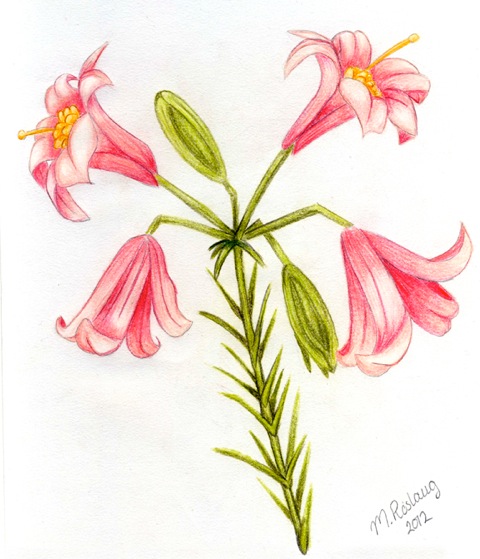
			<content type="html"><![CDATA[<p>Someone gave me some art books on drawing, surprisingly they also use the box model method of drawing, I guess that apply&#039;s to 2d and 3d. Anyways I was looking at the landscape section and seen a flower (Regal Lily) that looked easy enough to model.<br />I don&#039;t know about the rest of you but I would like to have some plants that are not just a 2d cutout on a flat plane.</p><p>It appears this flower vary&#039;s in shape, color and growth pattern. So I had to find a similar reference online to whats in my book.<span class="postimg"><img src="http://fc01.deviantart.net/fs70/f/2012/106/0/8/regal_lily_by_roslaug-d4wfoqe.jpg" alt="http://fc01.deviantart.net/fs70/f/2012/106/0/8/regal_lily_by_roslaug-d4wfoqe.jpg" /></span></p><br /><p>This is mine it didn&#039;t take very long to do, I just kinda went for it. Its not the best but for being my first flower, I like it <img src="http://forum.maratis3d.com/img/smilies/wink.png" width="15" height="15" alt="wink" /><br /><span class="postimg"><img src="https://lh6.googleusercontent.com/-H3PKcnLhBV4/UmVRgQJzsmI/AAAAAAAABs4/lZ6jE26oquY/w248-h458-no/RegalLilly.png" alt="https://lh6.googleusercontent.com/-H3PKcnLhBV4/UmVRgQJzsmI/AAAAAAAABs4/lZ6jE26oquY/w248-h458-no/RegalLilly.png" /></span></p><p>Note: This thing has 1000 polys, I can&#039;t see you wanting you use very many on a terrain, unless you don&#039;t mind blowing threw 100 thousand polys&nbsp; in flowers lol. Hmmm I wounder how duplication works in Maratis.</p>]]></content>
			<author>
				<name><![CDATA[zester]]></name>
				<uri>http://forum.maratis3d.com/profile.php?id=516</uri>
			</author>
			<updated>2013-10-21T16:14:49Z</updated>
			<id>http://forum.maratis3d.com/viewtopic.php?pid=5647#p5647</id>
		</entry>
		<entry>
			<title type="html"><![CDATA[Re: Terrain Creation and Texture Painting Tutorial]]></title>
			<link rel="alternate" href="http://forum.maratis3d.com/viewtopic.php?pid=5640#p5640"/>
			<content type="html"><![CDATA[<div class="quotebox"><cite>Tutorial Doctor wrote:</cite><blockquote><p>So, my cousin was playing GTA5 and I&#039;m looking at it like, &quot;huh?&quot; This is the ranted and raved about big box selling hit?<br />Mind you, I don&#039;t know much about the gaming industry right now, but if that is what sells, I know I can do that. <br />Zester, your terrain is much better than theirs. And they use flat planes for just about everything (I see where you get the image plane trick from).</p><p>I am seeing this on a 60&quot; fancy tv too. So I boot up Maratis and play a few of my demos on it. Uh, even they look better. As for the animations, those are easy too. </p><p>I do understand however that the SCALE of the game is much bigger, so that may be why they use so many tricks. </p><p>Your terrain looks awesome compared to what I just saw. haha. And you keep the poly count down? Perhaps I should work on some horse BVH files? hehe</p></blockquote></div><p>lol Thanks, not very many people build there terrains by hand anymore, most use terrain generators and special terrain systems in there game engines with a few specialized shaders. We don&#039;t have that luxury. </p><p>Skyrim&#039;s terrain was not hand made or painted, they used the above. </p><br /><p>The scale issue really comes down to your textures and how they are done, thats the hard part. Because even a texture map that is 16384x16384 may not be big enough to support your terrains scale, Note: a 16384x16384 png is like 600mb+ </p><p>Instead what is done is you chop your terrain up into tiles(more on this later), and you use multiple texture maps, the base texture map always tiles (512x512) and at a higher scale ratio(resized to a smaller size in blender)&nbsp; this causes the pixels in the 512x512 texture map to become denser and look sharper.</p><p>The second layer will be a fullsized transparent texture map like say 4096x4096 and we will paint on this to break up the uniformity of our base texture. So it doesn&#039;t look the same everywhere you look. The ground(path) in the following screenshot is using this method, (Sorry I know its hard to see the detail but trust me you can get your face right down there and there is no pixelation, stretching or blurring it looks hi-res).&nbsp; The hill sides are do not have a tiled base layer they are just the 4096x4096 base map, they would need to be separated from the path and have the same method used on them.</p><p><span class="postimg"><img src="https://lh3.googleusercontent.com/-CPmzXfINoiY/UmELJypQ0UI/AAAAAAAABps/LKirDQJ9nRg/w1071-h646-no/Screenshot11.png" alt="https://lh3.googleusercontent.com/-CPmzXfINoiY/UmELJypQ0UI/AAAAAAAABps/LKirDQJ9nRg/w1071-h646-no/Screenshot11.png" /></span></p><p>I am still working on this, in my spare time. I think I pretty much have it down, but just haven&#039;t tested it yet.</p>]]></content>
			<author>
				<name><![CDATA[zester]]></name>
				<uri>http://forum.maratis3d.com/profile.php?id=516</uri>
			</author>
			<updated>2013-10-21T13:14:46Z</updated>
			<id>http://forum.maratis3d.com/viewtopic.php?pid=5640#p5640</id>
		</entry>
		<entry>
			<title type="html"><![CDATA[Re: Terrain Creation and Texture Painting Tutorial]]></title>
			<link rel="alternate" href="http://forum.maratis3d.com/viewtopic.php?pid=5639#p5639"/>
			<content type="html"><![CDATA[<p>I wanted to do a terrain speed modeling exercise, before bed.</p><p>Subject: Vegas&#039;s Tower of Defense Game<br />Time: 60 Seconds</p><p>Ready Set Go ...<br /><span class="postimg"><img src="https://lh3.googleusercontent.com/-5FUaJED2DE0/UmTsjqb7GvI/AAAAAAAABsM/8UJnJKvhG7I/w871-h525-no/Screenshot2.png" alt="https://lh3.googleusercontent.com/-5FUaJED2DE0/UmTsjqb7GvI/AAAAAAAABsM/8UJnJKvhG7I/w871-h525-no/Screenshot2.png" /></span></p><p>Done<br /><span class="postimg"><img src="https://lh6.googleusercontent.com/-1MDUUnLTNhQ/UmTso3vBroI/AAAAAAAABsU/bgvbMTMSC5w/w871-h525-no/Screenshot27.png" alt="https://lh6.googleusercontent.com/-1MDUUnLTNhQ/UmTso3vBroI/AAAAAAAABsU/bgvbMTMSC5w/w871-h525-no/Screenshot27.png" /></span></p><p>The raised parts(colums) are actually bone, and the idea was &quot;Castle Ruins&quot;, with Large Bone&#039;s protruding from some of the stone features.</p><p>The part by the bridge is suppose to be a spinal column with a nail going threw it, and integrate a rusty gate as a short cut that would open up after the hordes had reached a certain point and activated a switch. </p><p>Clearly 60sec is not enough time to do all of that.</p>]]></content>
			<author>
				<name><![CDATA[zester]]></name>
				<uri>http://forum.maratis3d.com/profile.php?id=516</uri>
			</author>
			<updated>2013-10-21T09:06:25Z</updated>
			<id>http://forum.maratis3d.com/viewtopic.php?pid=5639#p5639</id>
		</entry>
		<entry>
			<title type="html"><![CDATA[Re: Terrain Creation and Texture Painting Tutorial]]></title>
			<link rel="alternate" href="http://forum.maratis3d.com/viewtopic.php?pid=5638#p5638"/>
			<content type="html"><![CDATA[<div class="quotebox"><cite>zester wrote:</cite><blockquote><p>Welcome back VeganDev.</p><div class="quotebox"><cite>VeganDev wrote:</cite><blockquote><p>I don&#039;t use blender, actually I avoid it whenever possible ( because sculptris is SO much better for this, and SO much easier!!! )</p></blockquote></div><p>Sculpting terrain in Blender like, Roberto Roch teaches with his &quot;Create a Rocky Video Game Terrain in Blender&quot; defiantly isn&#039;t a method I would recommend, it takes to long and requires to much artistic capability. Sculptris might be better suited, I don&#039;t know &quot;not a program I use&quot;. I use a different method entirely, its fast, easy to do. The above terrain took about an hour, but that was to figure out a good workflow. I(Anyone) can do the same terrain in about 20min or less once you have the workflow down. And then if you want to multires in Blender or &quot;Sculptris&quot; you can.</p><div class="quotebox"><cite>VeganDev wrote:</cite><blockquote><p>I<br />Oh btw, just in case; I want to state emphatically , for the record, that while some posts may contain references to disgusting, bloody, gruesome,&nbsp; violent things, that I in no way condone them on any level ( I am not here to support or accept them whatsoever ), wish we could all create non violent based games.</p></blockquote></div><p>Violent content can also be used to build empathy or used as a deterrent. You can show me one or two articles arguing your point, I can show hundreds of millions of examples&nbsp; proving mine. I once made a video game for a anti-smoking campaign, as effective as it was it was deemed to be far to explicit for there targeted age range, and never viewed outside of the test group. </p><p>I can still see it ... &quot;Want to play again? &quot;NO&quot; Want a cigarette? &quot;Tears&quot; ... &quot;Is that really how you die from smoking!!!&quot;&nbsp; Ummm yahhh kid thats really what its like. </p><p>Note: I doubt any of those kids ever did start smoking after I traumatized them.</p><br /><p>I can&#039;t wait for the Oculus Rift, I have a whole line up of Anti-Gang, Drug, Bullying, No Means NO!!!!, .... simulations.</p></blockquote></div><p>Well we all need heroes, and that won&#039;t ever change. Sad thing is, some kids take as heroes, those who should prob. be in jail, or are in jail. YOu had a bad childhood, I didn&#039;t, that&#039;s how life goes, but thankfully we can sometimes take that negativity, and turn it into something good. That&#039;s the preferred turnaround method <img src="http://forum.maratis3d.com/img/smilies/wink.png" width="15" height="15" alt="wink" /></p><p>However having said that, your example, is just like my high school days where the &#039;movie in drivers ed&#039; was quite gruesome, and aimed at making sure we would &#039;slow down&#039; and be extremely dutiful students behind the wheel. I suspect it worked overall , at least for a time, and then, based on childhood and peer pressure, there was another group determined to do nasty things regardless.</p><p>It&#039;s kind of comparing apples and oranges.&nbsp; I was mostly referring to&nbsp; unnecessary and gratuitoius violence in games, like GTA5, which my friend tells me, is even more violent than their predecessors ? NO idea, I&#039;ve not seen it nor do I plan on it <img src="http://forum.maratis3d.com/img/smilies/wink.png" width="15" height="15" alt="wink" /></p><p>IF the game would leave out the stupid stuff, and leave in the driving around, the snorkeling etc. etc., it would be far more popular I suspect, at least with the kids that have good grades and aren&#039;t in life just to cause trouble.</p><p>My path is about giving kids/adults less incentive to consider violence ( and the domino effect it can have, as has been seen) by offering games of equal or great enjoyment ( Hitchcock vs todays gruesome nonsense), and there are solid ( as I&#039;ve shown on these forums) articles backing me up, and your path to use a degree of violence to alter certain types of negative behavior. If so, well then, we get to the same conclusion via a bit different journey <img src="http://forum.maratis3d.com/img/smilies/wink.png" width="15" height="15" alt="wink" /></p><p>I liked your last terrain&nbsp; more about the texture honestly but it all looked nice <img src="http://forum.maratis3d.com/img/smilies/wink.png" width="15" height="15" alt="wink" /></p><p>All of our entries into game creation at the end of the day, if they are to be a lasting entry, are going to be all about the details and how much it draws in the player into the world we create.</p><p>Doubt that ( I know you don&#039;t of course), and play WoW sometime , or any similar MMORPG. Allods also looks very nice, though similar to WoW, having simplistic goals that please the masses. Fun at first maybe, especially with a friend, but it soon becomes oh so boring.</p><p>cu&nbsp; around <img src="http://forum.maratis3d.com/img/smilies/wink.png" width="15" height="15" alt="wink" /><br />VD</p>]]></content>
			<author>
				<name><![CDATA[VeganDev]]></name>
				<uri>http://forum.maratis3d.com/profile.php?id=18</uri>
			</author>
			<updated>2013-10-21T04:43:08Z</updated>
			<id>http://forum.maratis3d.com/viewtopic.php?pid=5638#p5638</id>
		</entry>
		<entry>
			<title type="html"><![CDATA[Re: Terrain Creation and Texture Painting Tutorial]]></title>
			<link rel="alternate" href="http://forum.maratis3d.com/viewtopic.php?pid=5637#p5637"/>
			<content type="html"><![CDATA[<p>Welcome back VeganDev.</p><div class="quotebox"><cite>VeganDev wrote:</cite><blockquote><p>I don&#039;t use blender, actually I avoid it whenever possible ( because sculptris is SO much better for this, and SO much easier!!! )</p></blockquote></div><p>Sculpting terrain in Blender like, Roberto Roch teaches with his &quot;Create a Rocky Video Game Terrain in Blender&quot; defiantly isn&#039;t a method I would recommend, it takes to long and requires to much artistic capability. Sculptris might be better suited, I don&#039;t know &quot;not a program I use&quot;. I use a different method entirely, its fast, easy to do. The above terrain took about an hour, but that was to figure out a good workflow. I(Anyone) can do the same terrain in about 20min or less once you have the workflow down. And then if you want to multires in Blender or &quot;Sculptris&quot; you can.</p><div class="quotebox"><cite>VeganDev wrote:</cite><blockquote><p>I<br />Oh btw, just in case; I want to state emphatically , for the record, that while some posts may contain references to disgusting, bloody, gruesome,&nbsp; violent things, that I in no way condone them on any level ( I am not here to support or accept them whatsoever ), wish we could all create non violent based games.</p></blockquote></div><p>Violent content can also be used to build empathy or used as a deterrent. You can show me one or two articles arguing your point, I can show hundreds of millions of examples&nbsp; proving mine. I once made a video game for a anti-smoking campaign, as effective as it was it was deemed to be far to explicit for there targeted age range, and never viewed outside of the test group. </p><p>I can still see it ... &quot;Want to play again? &quot;NO&quot; Want a cigarette? &quot;Tears&quot; ... &quot;Is that really how you die from smoking!!!&quot;&nbsp; Ummm yahhh kid thats really what its like. </p><p>Note: I doubt any of those kids ever did start smoking after I traumatized them.</p><br /><p>I can&#039;t wait for the Oculus Rift, I have a whole line up of Anti-Gang, Drug, Bullying, No Means NO!!!!, .... simulations.</p>]]></content>
			<author>
				<name><![CDATA[zester]]></name>
				<uri>http://forum.maratis3d.com/profile.php?id=516</uri>
			</author>
			<updated>2013-10-21T03:31:56Z</updated>
			<id>http://forum.maratis3d.com/viewtopic.php?pid=5637#p5637</id>
		</entry>
		<entry>
			<title type="html"><![CDATA[Re: Terrain Creation and Texture Painting Tutorial]]></title>
			<link rel="alternate" href="http://forum.maratis3d.com/viewtopic.php?pid=5636#p5636"/>
			<content type="html"><![CDATA[<p>So, my cousin was playing GTA5 and I&#039;m looking at it like, &quot;huh?&quot; This is the ranted and raved about big box selling hit?<br />Mind you, I don&#039;t know much about the gaming industry right now, but if that is what sells, I know I can do that. <br />Zester, your terrain is much better than theirs. And they use flat planes for just about everything (I see where you get the image plane trick from).</p><p>I am seeing this on a 60&quot; fancy tv too. So I boot up Maratis and play a few of my demos on it. Uh, even they look better. As for the animations, those are easy too. </p><p>I do understand however that the SCALE of the game is much bigger, so that may be why they use so many tricks. </p><p>Your terrain looks awesome compared to what I just saw. haha. And you keep the poly count down? Perhaps I should work on some horse BVH files? hehe</p>]]></content>
			<author>
				<name><![CDATA[Tutorial Doctor]]></name>
				<uri>http://forum.maratis3d.com/profile.php?id=2493</uri>
			</author>
			<updated>2013-10-21T03:08:15Z</updated>
			<id>http://forum.maratis3d.com/viewtopic.php?pid=5636#p5636</id>
		</entry>
		<entry>
			<title type="html"><![CDATA[Re: Terrain Creation and Texture Painting Tutorial]]></title>
			<link rel="alternate" href="http://forum.maratis3d.com/viewtopic.php?pid=5632#p5632"/>
			<content type="html"><![CDATA[<p>I don&#039;t use blender, actually I avoid it whenever possible ( because sculptris is SO much better for this, and SO much easier!!! ), but having said this, I was successful, finally, in getting textured terrains into Maratis. I was pleased to have success, though honeslty its way too much of a headache for words. It should be a streamlined process, not a invite to calamity <img src="http://forum.maratis3d.com/img/smilies/wink.png" width="15" height="15" alt="wink" /> I hope somehow over time, this is fixed <img src="http://forum.maratis3d.com/img/smilies/wink.png" width="15" height="15" alt="wink" /> I may throw up a tutorial of my own, who knows <img src="http://forum.maratis3d.com/img/smilies/wink.png" width="15" height="15" alt="wink" /> It seems to be a popular thing lately, and now that I have a MIC and a good recording tool both audio and visual...</p><p>Oh btw, just in case; I want to state emphatically , for the record, that while some posts may contain references to disgusting, bloody, gruesome,&nbsp; violent things, that I in no way condone them on any level ( I am not here to support or accept them whatsoever ), wish we could all create non violent based games, and that my signature makes that clear. I am here to partake in the use of a promising MIT based engine , that unlike many other engines, has a decent overall editor with promise.</p><p>So thanks Anael for that, though I hope someday you fix the plugin stuff so we aren&#039;t a split community ? <img src="http://forum.maratis3d.com/img/smilies/wink.png" width="15" height="15" alt="wink" /></p>]]></content>
			<author>
				<name><![CDATA[VeganDev]]></name>
				<uri>http://forum.maratis3d.com/profile.php?id=18</uri>
			</author>
			<updated>2013-10-20T18:23:57Z</updated>
			<id>http://forum.maratis3d.com/viewtopic.php?pid=5632#p5632</id>
		</entry>
		<entry>
			<title type="html"><![CDATA[Re: Terrain Creation and Texture Painting Tutorial]]></title>
			<link rel="alternate" href="http://forum.maratis3d.com/viewtopic.php?pid=5627#p5627"/>
			<content type="html"><![CDATA[<p>Image format matters either.</p><p>For example, the torch in Jules demo is a png file (with alpha transparency).</p><p>If we convert into jpg (for filesize matters for example) and tweak the Blendmode, the black background becomes transparent, although jpg format doesn&#039;t handle transparency.</p>]]></content>
			<author>
				<name><![CDATA[com3D]]></name>
				<uri>http://forum.maratis3d.com/profile.php?id=1488</uri>
			</author>
			<updated>2013-10-20T16:13:18Z</updated>
			<id>http://forum.maratis3d.com/viewtopic.php?pid=5627#p5627</id>
		</entry>
		<entry>
			<title type="html"><![CDATA[Re: Terrain Creation and Texture Painting Tutorial]]></title>
			<link rel="alternate" href="http://forum.maratis3d.com/viewtopic.php?pid=5625#p5625"/>
			<content type="html"><![CDATA[<p>Interesting, thanks Vegas. You are right zester, this would be frustrating. Gotta whoop Blender into shape. haha.</p>]]></content>
			<author>
				<name><![CDATA[Tutorial Doctor]]></name>
				<uri>http://forum.maratis3d.com/profile.php?id=2493</uri>
			</author>
			<updated>2013-10-20T16:00:11Z</updated>
			<id>http://forum.maratis3d.com/viewtopic.php?pid=5625#p5625</id>
		</entry>
		<entry>
			<title type="html"><![CDATA[Re: Terrain Creation and Texture Painting Tutorial]]></title>
			<link rel="alternate" href="http://forum.maratis3d.com/viewtopic.php?pid=5624#p5624"/>
			<content type="html"><![CDATA[<div class="quotebox"><cite>com3D wrote:</cite><blockquote><p>And don&#039;t forget to set the appropriate Maratis BlendMode (just below material Transparency)</p></blockquote></div><p>It depends, i had to use that material option in some situations but i couldn&#039;t remember what,<br />so i made some tests :</p><p>1. Full transparent image // Blendmode : None<br /><span class="postimg"><img src="https://dl.dropboxusercontent.com/u/19970067/Maratis/Various/tsp2.jpg" alt="PunBB bbcode test" /></span></p><p>2. Full transparent image // Blendmode : Alpha<br /><span class="postimg"><img src="https://dl.dropboxusercontent.com/u/19970067/Maratis/Various/tsp3.jpg" alt="PunBB bbcode test" /></span></p><p>3. Blue color (60% opacity) // Blendmode : Alpha<br /><span class="postimg"><img src="https://dl.dropboxusercontent.com/u/19970067/Maratis/Various/tsp1.jpg" alt="PunBB bbcode test" /></span></p><p>4. Blue color (60% opacity) // Blendmode : None<br />I didn&#039;t kept the screenshot ! &gt;.&lt; but result was similiar to (2) and the blue edges were visible all around the brush shape (like when you don&#039;t premultiply your texture in blender).. the blue background was gone.</p><p>So it seems you can&#039;t get shadows when the blendemode is set to alpha. on the other hand you can see through colors.</p>]]></content>
			<author>
				<name><![CDATA[Vegas]]></name>
				<uri>http://forum.maratis3d.com/profile.php?id=53</uri>
			</author>
			<updated>2013-10-20T14:04:40Z</updated>
			<id>http://forum.maratis3d.com/viewtopic.php?pid=5624#p5624</id>
		</entry>
</feed>