<?xml version="1.0" encoding="utf-8"?>
<feed xmlns="http://www.w3.org/2005/Atom">
	<title type="html"><![CDATA[Maratis forum - Making a game with Maratis]]></title>
	<link rel="self" href="http://forum.maratis3d.com/extern.php?action=feed&amp;tid=873&amp;type=atom"/>
	<updated>2014-05-13T15:45:05Z</updated>
	<generator>PunBB</generator>
	<id>http://forum.maratis3d.com/viewtopic.php?id=873</id>
		<entry>
			<title type="html"><![CDATA[Re: Making a game with Maratis]]></title>
			<link rel="alternate" href="http://forum.maratis3d.com/viewtopic.php?pid=6765#p6765"/>
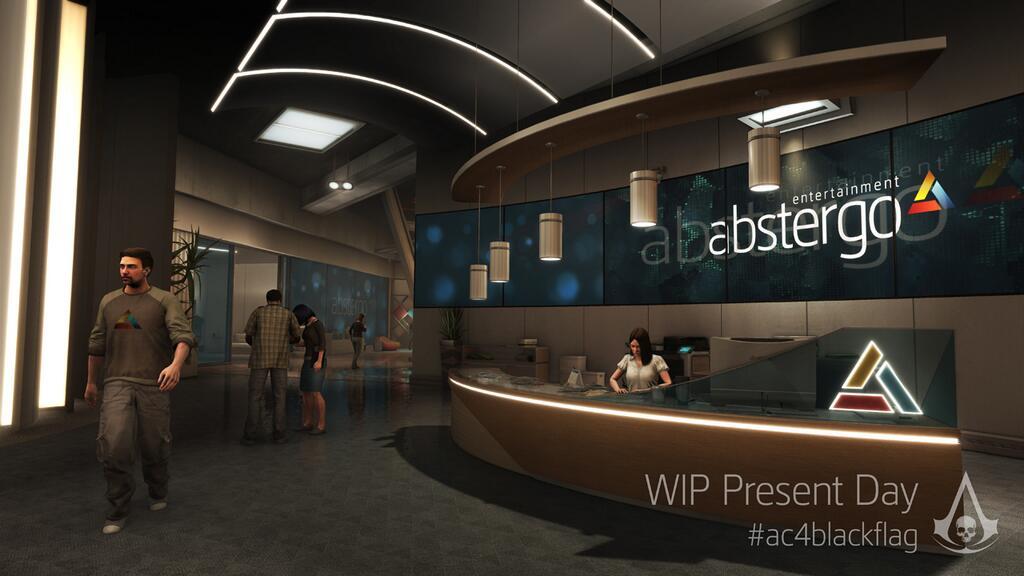
			<content type="html"><![CDATA[<p>The screenshots above are looking a lot more doable now that I have a UV unwrapping technique and export workflow in Blender established. The lighting shouldn&#039;t be that hard either.</p>]]></content>
			<author>
				<name><![CDATA[Tutorial Doctor]]></name>
				<uri>http://forum.maratis3d.com/profile.php?id=2493</uri>
			</author>
			<updated>2014-05-13T15:45:05Z</updated>
			<id>http://forum.maratis3d.com/viewtopic.php?pid=6765#p6765</id>
		</entry>
		<entry>
			<title type="html"><![CDATA[Re: Making a game with Maratis]]></title>
			<link rel="alternate" href="http://forum.maratis3d.com/viewtopic.php?pid=6731#p6731"/>
			<content type="html"><![CDATA[<p>I am getting closer to being able to make the 3rd person game:</p><p><a href="http://forum.maratis3d.com/viewtopic.php?id=763">http://forum.maratis3d.com/viewtopic.php?id=763</a></p>]]></content>
			<author>
				<name><![CDATA[Tutorial Doctor]]></name>
				<uri>http://forum.maratis3d.com/profile.php?id=2493</uri>
			</author>
			<updated>2014-04-28T17:31:49Z</updated>
			<id>http://forum.maratis3d.com/viewtopic.php?pid=6731#p6731</id>
		</entry>
		<entry>
			<title type="html"><![CDATA[Re: Making a game with Maratis]]></title>
			<link rel="alternate" href="http://forum.maratis3d.com/viewtopic.php?pid=6278#p6278"/>
			<content type="html"><![CDATA[<p>Okay, I have an idea. I&#039;m going to make a maze game. This is simple enough.</p>]]></content>
			<author>
				<name><![CDATA[Tutorial Doctor]]></name>
				<uri>http://forum.maratis3d.com/profile.php?id=2493</uri>
			</author>
			<updated>2014-01-29T07:30:47Z</updated>
			<id>http://forum.maratis3d.com/viewtopic.php?pid=6278#p6278</id>
		</entry>
		<entry>
			<title type="html"><![CDATA[Re: Making a game with Maratis]]></title>
			<link rel="alternate" href="http://forum.maratis3d.com/viewtopic.php?pid=6212#p6212"/>
			<content type="html"><![CDATA[<p>This process is a good process, but this particular game will be a little too challenging for my first game (at least the scale of my idea for the dress-up game go to big). </p><p>I am going to go for a simple 3rd person game with progression through levels. No extra characters, and no complex mechanics. </p><p>I will post the progress here...</p>]]></content>
			<author>
				<name><![CDATA[Tutorial Doctor]]></name>
				<uri>http://forum.maratis3d.com/profile.php?id=2493</uri>
			</author>
			<updated>2014-01-20T03:51:20Z</updated>
			<id>http://forum.maratis3d.com/viewtopic.php?pid=6212#p6212</id>
		</entry>
		<entry>
			<title type="html"><![CDATA[Re: Making a game with Maratis]]></title>
			<link rel="alternate" href="http://forum.maratis3d.com/viewtopic.php?pid=6120#p6120"/>
			<content type="html"><![CDATA[<p>Okay, been learning a lot of stuff on Gamedev.net. I think a level like the one above is possible. I am going to try a new process to development and I am going to try to make it as fast as possible. I think I will have to break it down into small manageable pieces and do things in stages. </p><p>So taking the first screenshot I could break up the modeling like this:</p><p>Modeling<br />Texturing<br />Lighting<br />Sound<br />CGS (Customizable game script for testing environment)<br />Add a Character to walk around. </p><p>Then I can break up each task into smaller tasks</p><p>Modeling:<br />Main area shape<br />Seating <br />plants<br />Machines</p><p>I could iterate over these with details:<br />Large Details<br />Medium Details<br />Small details (if needed)</p><br /><p>Texturing:<br />Floor<br />Wall<br />Ceiling</p><p>Lighting:<br />Ambient Occlusion<br />Spot &amp; Point lights</p><p>Sound:<br />Main Ambient sound<br />Secondary ambient sound<br />Voice overs</p><p>etc.</p><p>I can use either the SDLC method or the RAD method as my process for doing this. Since this is a test game, I will a mixture of the two models, leaning more towards the RAD system (I want this to go quickly). </p><p>So I:</p><p>PLAN<br />DESIGN<br />CONSTRUCT<br />DISPOSE</p>]]></content>
			<author>
				<name><![CDATA[Tutorial Doctor]]></name>
				<uri>http://forum.maratis3d.com/profile.php?id=2493</uri>
			</author>
			<updated>2014-01-01T06:48:52Z</updated>
			<id>http://forum.maratis3d.com/viewtopic.php?pid=6120#p6120</id>
		</entry>
		<entry>
			<title type="html"><![CDATA[Re: Making a game with Maratis]]></title>
			<link rel="alternate" href="http://forum.maratis3d.com/viewtopic.php?pid=6030#p6030"/>
			<content type="html"><![CDATA[<p>I was really inspired lately when I went into my brother&#039;s room and saw him playing a game. This is a screenshot from the level he was playing:</p><p><span class="postimg"><img src="http://wimages.vr-zone.net/2013/08/AC4-Black-Flag-Present-Day-4.jpg" alt="http://wimages.vr-zone.net/2013/08/AC4-Black-Flag-Present-Day-4.jpg" /></span><br /><span class="postimg"><img src="http://www.ps4home.com/wp-content/uploads/2013/08/Assassin%E2%80%99s-Creed-IV-Black-Flag-Present-Day-Screenshots-4-Copy.jpg" alt="http://www.ps4home.com/wp-content/uploads/2013/08/Assassin%E2%80%99s-Creed-IV-Black-Flag-Present-Day-Screenshots-4-Copy.jpg" /></span></p>]]></content>
			<author>
				<name><![CDATA[Tutorial Doctor]]></name>
				<uri>http://forum.maratis3d.com/profile.php?id=2493</uri>
			</author>
			<updated>2013-11-27T23:09:44Z</updated>
			<id>http://forum.maratis3d.com/viewtopic.php?pid=6030#p6030</id>
		</entry>
		<entry>
			<title type="html"><![CDATA[Re: Making a game with Maratis]]></title>
			<link rel="alternate" href="http://forum.maratis3d.com/viewtopic.php?pid=6009#p6009"/>
			<content type="html"><![CDATA[<p>I know my issue. My ideas are too radical. And if what I am making can&#039;t meat my ideas (perhaps limitations on my part) then I will scrap the whole thing. I have so many ideas for this now that I can&#039;t keep it basic. I am working on animation right now though. </p><p>The gameplay aspect will be easy, but the game mechanics part might be a little difficult, because I want it to be engaging.</p>]]></content>
			<author>
				<name><![CDATA[Tutorial Doctor]]></name>
				<uri>http://forum.maratis3d.com/profile.php?id=2493</uri>
			</author>
			<updated>2013-11-24T03:51:21Z</updated>
			<id>http://forum.maratis3d.com/viewtopic.php?pid=6009#p6009</id>
		</entry>
		<entry>
			<title type="html"><![CDATA[Re: Making a game with Maratis]]></title>
			<link rel="alternate" href="http://forum.maratis3d.com/viewtopic.php?pid=5963#p5963"/>
			<content type="html"><![CDATA[<p>It certainly makes making hair really quick. </p><p>I just made a crazy shape and draped it over this mesh. Then I added a displace modifier and a subsurf modifier. Unwrapped using Smart UV project. </p><p>note: I had to pin the center-most face so that it would not topple off of the head (put it in a vertex group and used the &quot;pinning&quot; box in the cloth settings. </p><p><span class="postimg"><img src="https://sites.google.com/site/maratisfiles/files/Screenshot%20%28876%29.png" alt="https://sites.google.com/site/maratisfiles/files/Screenshot%20%28876%29.png" /></span><br /><span class="postimg"><img src="https://sites.google.com/site/maratisfiles/files/Screenshot%20%28877%29.png" alt="https://sites.google.com/site/maratisfiles/files/Screenshot%20%28877%29.png" /></span><br />Okay, used it for a dress also. This is how I will proceed. Thanks com3d<br /><span class="postimg"><img src="https://sites.google.com/site/maratisfiles/files/Screenshot%20%28878%29.png" alt="https://sites.google.com/site/maratisfiles/files/Screenshot%20%28878%29.png" /></span></p>]]></content>
			<author>
				<name><![CDATA[Tutorial Doctor]]></name>
				<uri>http://forum.maratis3d.com/profile.php?id=2493</uri>
			</author>
			<updated>2013-11-14T20:08:02Z</updated>
			<id>http://forum.maratis3d.com/viewtopic.php?pid=5963#p5963</id>
		</entry>
		<entry>
			<title type="html"><![CDATA[Re: Making a game with Maratis]]></title>
			<link rel="alternate" href="http://forum.maratis3d.com/viewtopic.php?pid=5962#p5962"/>
			<content type="html"><![CDATA[<p><a href="http://www.bsrufaces.info">www.bsrufaces.info</a></p><p>Shows up when I hover over</p><p>Found the link</p><p><a href="http://blenderartists.org/forum/showthread.php?225190-Bsurfaces-v1-5">http://blenderartists.org/forum/showthr &#133; faces-v1-5</a></p>]]></content>
			<author>
				<name><![CDATA[Tutorial Doctor]]></name>
				<uri>http://forum.maratis3d.com/profile.php?id=2493</uri>
			</author>
			<updated>2013-11-14T18:48:01Z</updated>
			<id>http://forum.maratis3d.com/viewtopic.php?pid=5962#p5962</id>
		</entry>
		<entry>
			<title type="html"><![CDATA[Re: Making a game with Maratis]]></title>
			<link rel="alternate" href="http://forum.maratis3d.com/viewtopic.php?pid=5961#p5961"/>
			<content type="html"><![CDATA[<div class="quotebox"><cite>Tutorial Doctor wrote:</cite><blockquote><p>Hmm. I try to click on the link to the file and I get a website about free teeth cleaning.</p></blockquote></div><p>What url shows up when you are hovering ?</p>]]></content>
			<author>
				<name><![CDATA[com3D]]></name>
				<uri>http://forum.maratis3d.com/profile.php?id=1488</uri>
			</author>
			<updated>2013-11-14T17:59:23Z</updated>
			<id>http://forum.maratis3d.com/viewtopic.php?pid=5961#p5961</id>
		</entry>
		<entry>
			<title type="html"><![CDATA[Re: Making a game with Maratis]]></title>
			<link rel="alternate" href="http://forum.maratis3d.com/viewtopic.php?pid=5960#p5960"/>
			<content type="html"><![CDATA[<p>Looks promising... <img src="http://forum.maratis3d.com/img/smilies/big_smile.png" width="15" height="15" alt="big_smile" /></p>]]></content>
			<author>
				<name><![CDATA[com3D]]></name>
				<uri>http://forum.maratis3d.com/profile.php?id=1488</uri>
			</author>
			<updated>2013-11-14T17:56:38Z</updated>
			<id>http://forum.maratis3d.com/viewtopic.php?pid=5960#p5960</id>
		</entry>
		<entry>
			<title type="html"><![CDATA[Re: Making a game with Maratis]]></title>
			<link rel="alternate" href="http://forum.maratis3d.com/viewtopic.php?pid=5959#p5959"/>
			<content type="html"><![CDATA[<p>Hmm. I try to click on the link to the file and I get a website about free teeth cleaning.</p><p>Edit. Okay, Bsurfaces is included with the latest version of Blender. Thanks. </p><p><span class="postimg"><img src="https://sites.google.com/site/maratisfiles/files/Screenshot%20%28874%29.png" alt="https://sites.google.com/site/maratisfiles/files/Screenshot%20%28874%29.png" /></span></p><p>First attempt at using it</p>]]></content>
			<author>
				<name><![CDATA[Tutorial Doctor]]></name>
				<uri>http://forum.maratis3d.com/profile.php?id=2493</uri>
			</author>
			<updated>2013-11-14T16:20:27Z</updated>
			<id>http://forum.maratis3d.com/viewtopic.php?pid=5959#p5959</id>
		</entry>
		<entry>
			<title type="html"><![CDATA[Re: Making a game with Maratis]]></title>
			<link rel="alternate" href="http://forum.maratis3d.com/viewtopic.php?pid=5958#p5958"/>
			<content type="html"><![CDATA[<p>You can use <a href="http://wiki.blender.org/index.php/Dev:Ref/Release_Notes/2.64/Bsurfaces_1.5">Bsurfaces</a>.<br />See video at about 15&#039;.</p>]]></content>
			<author>
				<name><![CDATA[com3D]]></name>
				<uri>http://forum.maratis3d.com/profile.php?id=1488</uri>
			</author>
			<updated>2013-11-14T07:35:09Z</updated>
			<id>http://forum.maratis3d.com/viewtopic.php?pid=5958#p5958</id>
		</entry>
		<entry>
			<title type="html"><![CDATA[Re: Making a game with Maratis]]></title>
			<link rel="alternate" href="http://forum.maratis3d.com/viewtopic.php?pid=5956#p5956"/>
			<content type="html"><![CDATA[<p>At a standstill. Looking for a quicker and easier FREE way to create clothing. I found a software called Virtual Fashion Pro 1.5. I can&#039;t get it to export. Will not continue until I figure this out.</p>]]></content>
			<author>
				<name><![CDATA[Tutorial Doctor]]></name>
				<uri>http://forum.maratis3d.com/profile.php?id=2493</uri>
			</author>
			<updated>2013-11-14T03:07:29Z</updated>
			<id>http://forum.maratis3d.com/viewtopic.php?pid=5956#p5956</id>
		</entry>
		<entry>
			<title type="html"><![CDATA[Making a game with Maratis]]></title>
			<link rel="alternate" href="http://forum.maratis3d.com/viewtopic.php?pid=5942#p5942"/>
			<content type="html"><![CDATA[<p>I am on a mission to make a small but complete game with Maratis. I guess the process would serve as a good tutorial on how I will make it. So I will post the process here. I will also be updating my other posts with content also (like the bvh animation page and the game assets page) as I create content for this game. </p><p>I will be making a basic dress up game using my character select demo as a base:<br /><a href="http://forum.maratis3d.com/viewtopic.php?id=775.">http://forum.maratis3d.com/viewtopic.php?id=775.</a> <br />And now for my first step:</p><h5>STEP 1: TIME TO PLAY!</h5><p>So, I&#039;m off to play some dress up games. This way I can collect some ideas, and get some inspiration for how I want my game to be. Along the way I will sketch some ideas down.<br />2013-11-10</p><p>TIME TO PLAY Resources:</p><p>-Toca Hair salon<br /><a href="https://itunes.apple.com/us/app/toca-hair-salon-2/id569632660?mt=8">https://itunes.apple.com/us/app/toca-ha &#133; 32660?mt=8</a></p><p>-Fashion Star<br /><a href="https://itunes.apple.com/us/app/fashion-star-boutique/id503000503?mt=8">https://itunes.apple.com/us/app/fashion &#133; 00503?mt=8</a></p><p>-Design it Princess Fashion<br /><a href="https://itunes.apple.com/us/app/design-it!-princess-fashion/id677616499?mt=8">https://itunes.apple.com/us/app/design- &#133; 16499?mt=8</a></p><p>-Style me Girl<br /><a href="https://itunes.apple.com/us/app/style-me-girl-free-3d-fashion/id521514229?mt=8">https://itunes.apple.com/us/app/style-m &#133; 14229?mt=8</a></p><h5>STEP 2: DESIGN PROTOTYPING:</h5><p>So, I want to prototype the design of the game. I won&#039;t be using models I made, just models I could find for free to fill in space. I just want to get the impression of the setup of the game. I could even use basic primitive, but that isn&#039;t fun. I am going to upload several photos of this phase. </p><p><span class="postimg"><img src="https://sites.google.com/site/maratisfiles/files/Screenshot%20%28860%29.png" alt="https://sites.google.com/site/maratisfiles/files/Screenshot%20%28860%29.png" /></span><br /><span class="postimg"><img src="https://sites.google.com/site/maratisfiles/files/Screenshot%20%28861%29.png" alt="https://sites.google.com/site/maratisfiles/files/Screenshot%20%28861%29.png" /></span><br /><span class="postimg"><img src="https://sites.google.com/site/maratisfiles/files/Screenshot%20%28866%29.png" alt="https://sites.google.com/site/maratisfiles/files/Screenshot%20%28866%29.png" /></span></p><h5>STEP 3: OORRWEDO</h5><p>If you haven&#039;t checked out my tutorial on &quot;How to Game&quot; You can here:<br /><a href="http://forum.maratis3d.com/viewtopic.php?id=811">http://forum.maratis3d.com/viewtopic.php?id=811</a></p><p>I am going to turn it into a game following the OORRWEDO process:</p><h5>1) Objectives:</h5><p>Walk through the store choosing your wardrobe.<br />Apply your wardrobe to the mannequin to see how it looks. <br />When satisfied, apply your wardrobe to a runway model.</p><h5>2) Obstacles:</h5><h5>3) Reward:</h5><p>You get to see your wardrobe on your model as they walk the runway. You also get money if your wardrobe is successful. </p><h5>4) Rules:</h5><p>Points are given based on how pieces are paired. Each article of clothing has an initial point value attached to it. The maximum score for a complete wardrobe is 10 points. However, certain articles of clothing conflict with other articles of clothing, taking away from the overall point value of the wardrobe. </p><p>For instance, if you have a brown top which has +2 points, and khaki colored slacks +6 then you get 10 points. However, if you have a brown top (+2) and purple slacks, you get no points for the purple slacks unless they work in a way (accessories).</p><p>(I will be working out the rules as I continue the project, for now, I am going to start on the next step.)<br />2013-11-12</p><h5>STEP 4: GATHERING THE TOOLS</h5><p>I have been doing some testing to see what tools I can use to make this game. This is the list of tools I will be using:</p><p>Google Sketchup 8(level design)<br />Quidam(character creation)<br />Makehuman(character creation)<br />Blender(rigging, animation, and exporting)<br />Poser(cloth simulation)<br />Gimp(photo editing and normal map creation)</p><h5>STEP 5: BLOCKING</h5><p>Okay, I am going to start blocking in some stuff. I am not focused on details or fine tuning. Just blocking in place holders. First I am going to work on the level (this game will only have one level. Then I will work on some basic coding. Perhaps I will use my customizable game script to get started.</p><p>I also added a background sound to the mall level to set the mood of the level. I might try to block in some walking people.<br /></p><h5>Level</h5><p><span class="postimg"><img src="https://sites.google.com/site/maratisfiles/files/Screenshot%20%28881%29.png" alt="https://sites.google.com/site/maratisfiles/files/Screenshot%20%28881%29.png" /></span><br /></p><h5>Menu</h5><p><span class="postimg"><img src="https://sites.google.com/site/maratisfiles/files/Screenshot%20%28883%29.png" alt="https://sites.google.com/site/maratisfiles/files/Screenshot%20%28883%29.png" /></span><br />For now the menu doesn&#039;t work when you click it. I will apply the unprojected point function as was used in my State level to make it work.<br /></p><h5>Better Menu</h5><p><span class="postimg"><img src="https://sites.google.com/site/maratisfiles/files/Screenshot%20%28889%29.png" alt="https://sites.google.com/site/maratisfiles/files/Screenshot%20%28889%29.png" /></span><br />Using unrpojected point (Thanks Vegas)</p><h5>Crowd</h5><p><span class="postimg"><img src="https://sites.google.com/site/maratisfiles/files/Screenshot%20%28885%29.png" alt="https://sites.google.com/site/maratisfiles/files/Screenshot%20%28885%29.png" /></span><br />I used &quot;One Bone Animation&quot; to slide these billboard people around (check my posts)<br /></p><h5>Text Box</h5><p><span class="postimg"><img src="https://sites.google.com/site/maratisfiles/files/Screenshot%20%28888%29.png" alt="https://sites.google.com/site/maratisfiles/files/Screenshot%20%28888%29.png" /></span><br />The graphic for this text box is easy to change. The rectangle is just a place holder. </p><h5>STEP 6: GAMEPLAY &amp; GAME MECHANICS</h5><p>Now to figure out the gameplay (that is what makes a game interesting after all). </p><p>Thinking...</p>]]></content>
			<author>
				<name><![CDATA[Tutorial Doctor]]></name>
				<uri>http://forum.maratis3d.com/profile.php?id=2493</uri>
			</author>
			<updated>2013-11-10T15:44:47Z</updated>
			<id>http://forum.maratis3d.com/viewtopic.php?pid=5942#p5942</id>
		</entry>
</feed>
